Klient Feature Spotlight
Klient Insights: Run the Monday Portfolio Review From One Live Screen
Klient Insights puts margin, utilization, unbilled time and slipping work on one live screen inside Salesforce, so the Monday review starts with answers instead of exports.
It’s Sunday night and the portfolio review is at nine. Someone on your team is exporting five Salesforce reports into a spreadsheet, because no single report joins projects, time entries and invoices. The deck ends up as screenshots. At 9:15 a partner asks why one project’s margin dropped, and the answer sits in a report nobody built.
That routine costs more than a Sunday evening. While the numbers live in a spreadsheet, overbooked people stay overbooked, billable hours sit uninvoiced, and a slipping project gets noticed a week late. Klient Insights is the dashboard workspace in Klient PSA. It reads your project, time, billing and people records as they are right now, so the review runs on live data.
See Klient Insights on your data: book a demo →
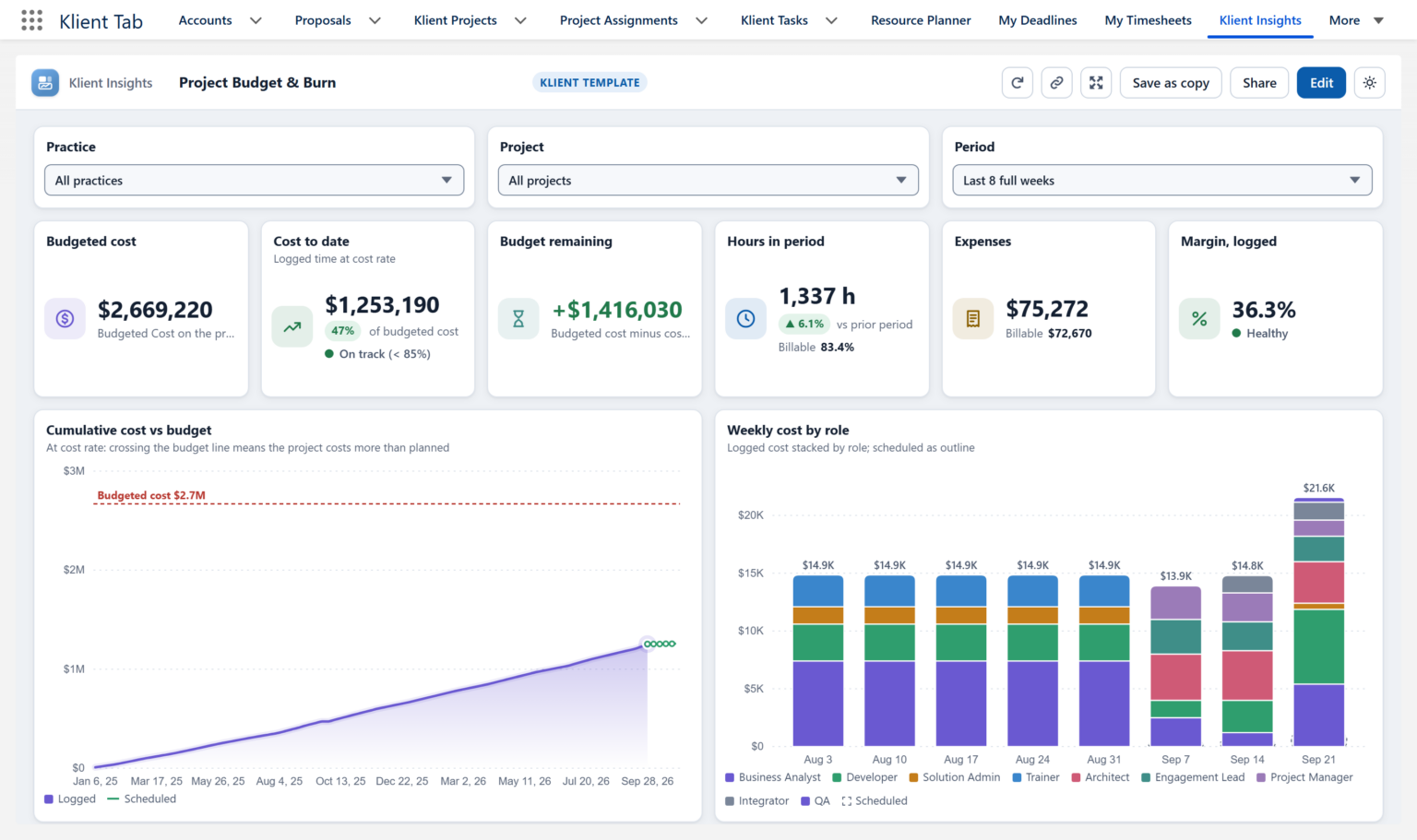
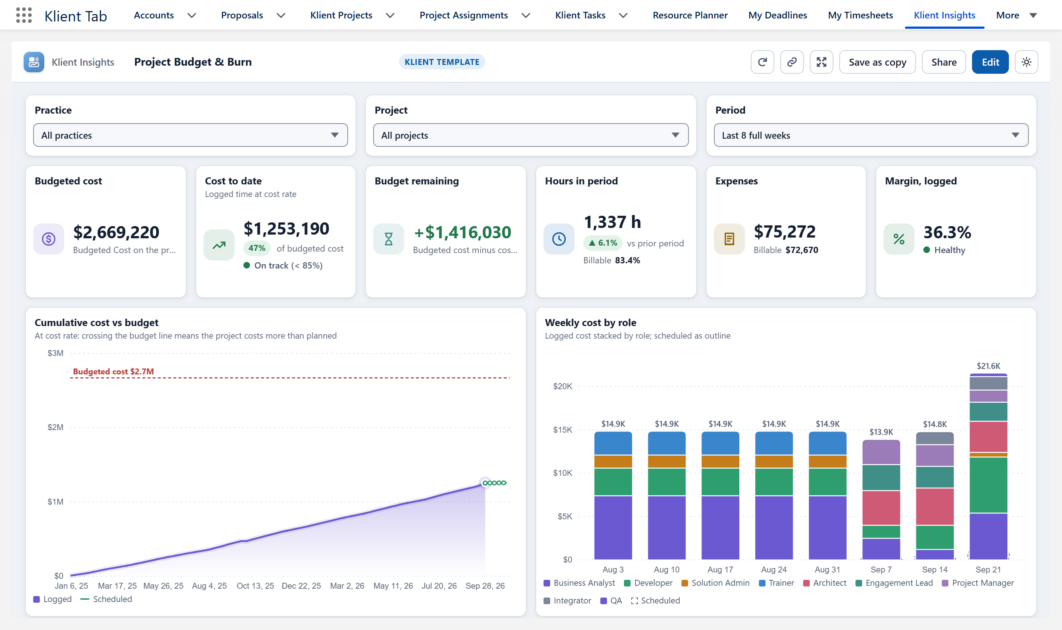
Project Budget & Burn: budgeted cost against the cost of the time logged, filtered by practice, project and period.
★ 4.96/5 on the Salesforce AppExchange (80+ reviews) · 4.5/5 on G2 (80+ reviews)
What is Klient Insights?
Klient Insights is the dashboard feature of Klient PSA, the Salesforce-native PSA. It ships 19 ready-made Klient templates built for services firms, grouped in six sections such as Delivery & projects and Finance. Each person’s home recommends the templates that fit their project role, so a practice lead and a finance lead don’t start from the same screen.
Think of it as PSA dashboards that already know how a services firm works: projects, time, bookings, invoices and people, on the Salesforce org your firm already runs.
Which four questions does the Monday review need answered?
Most Monday reviews come down to four questions, and each one has a Klient template that answers it with no report to build first.
| The question | Open this template |
|---|---|
| Are we making money on this work? | Project Budget & Burn and Profitability: budgeted cost against the cost of time logged, and margin by project, practice and billing type. |
| Who is on the bench, and who is overbooked? | Resource Utilization and Capacity & Demand: logged hours against capacity, booked hours ahead, and demand nobody is booked on yet. |
| Where is revenue leaking? | Revenue & Billing: billable time not invoiced yet, invoices still in draft, and invoices issued but unpaid. |
| What will slip this week? | Delivery & Attention and Portfolio Health: overdue and blocked work by project and owner, and active projects at risk or ending soon. |
The other templates cover leadership, customers, timesheets, onboarding, HR and data quality. When the bench question turns into a staffing decision, the people side lives in Salesforce resource management in the same org.
How does Klient Insights work in Salesforce?
One component can join several objects
A standard Salesforce chart reads one source report. A Klient Insights component can reach fields up to five lookups away, pull in related lists, and merge several datasets on a key. In practice, one table of projects can carry the account, the hours logged and the amounts invoiced side by side, which is exactly the view people usually rebuild in a spreadsheet.
Every filter feeds the whole dashboard
Pick a practice or a period at the top and every component changes at once. Filters narrow each other too: the Project list follows the Practice you pick. A dashboard can also know who is looking, which is how My Work and My Team show each person their own hours, tasks and team.
Any number opens the records behind it
Click a bar, a slice or a table row and the records behind it open in a pane beside the chart. “14 overdue tasks” becomes the 14 tasks, each with a link. The argument about whose spreadsheet is right ends there.

Drill-down: the overdue tasks behind one bar, with a link to each.
A player for the meeting itself
Select Play on the dashboards you need, in the order of the agenda, and the player shows them full screen one after another. Filters and drill-down keep working while you present, so the follow-up question gets answered in the room. Left on a wall screen, the player refreshes the data every five minutes.
Which clients need attention this week?
The Account & Project Scorecard answers what an account or practice lead asks first. Every account sits in one sortable table: projects, budgeted cost, hours over 12 months, logged and booked trends, unpaid invoices, overdue tasks and margin. Sort by margin and the accounts losing money rise to the top.
Below the table, the accounts that matter most stand side by side, each with a verdict, Healthy or Slipping, and the signals behind it: projects in the red, overdue work, billable share, bookings ahead, the last time anyone logged time or sent an invoice, and what is still unpaid.
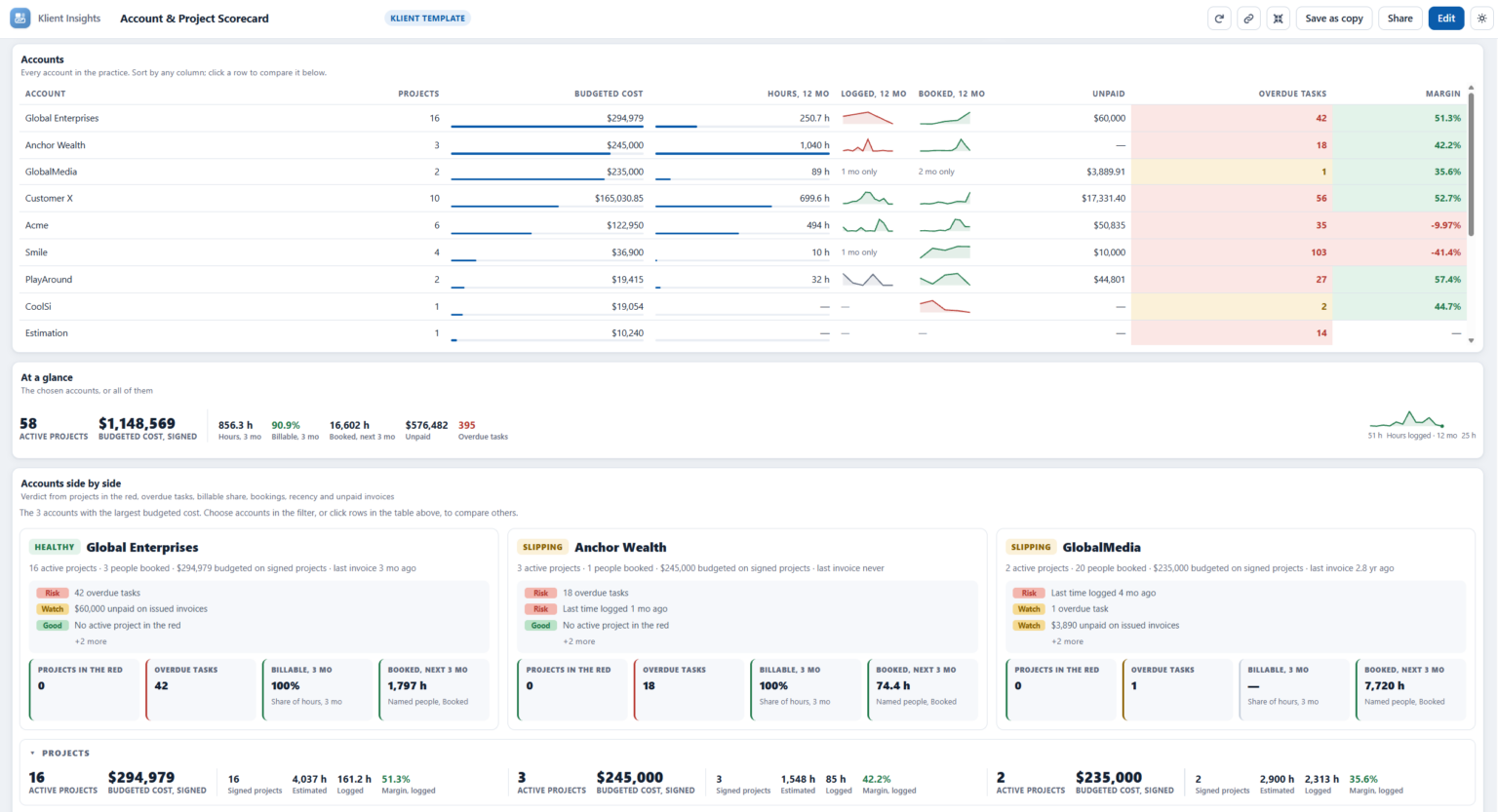
Account & Project Scorecard: every account in one table, then a Healthy or Slipping verdict with the reasons.
Standard Salesforce dashboards vs Klient Insights
Standard Salesforce dashboards can answer these questions, one report at a time. Here is the same Monday prep both ways, for a practice lead who needs budget burn, overdue work and unbilled time before nine.
| Standard reports and dashboards | With Klient Insights |
|---|---|
| Build or find a report type that joins the objects | Open Portfolio Health or Project Budget & Burn |
| Build one source report per chart | One component joins projects, time, bookings and invoices |
| Export what the reports can’t join to a spreadsheet | Pick the practice and the period; every component follows |
| Paste screenshots into the deck | Press Play and click any number when someone asks why |
| The deck is out of date when the meeting starts | The data is live, and refreshes every five minutes on a wall screen |
What it means for your business
Catch margin loss while you can still fix it
Budget burn and margin by project and practice are on screen every week, so a project going red shows up mid-flight, not at the post-mortem.
Bill the hours you already worked
Revenue & Billing lists billable time not invoiced yet and drafts nobody sent. That is cash sitting in your own org.
Staff before someone burns out
Capacity against bookings shows who is overbooked and who is free next month, before the overtime and before the bench.
Give the reporting hours back
The Monday review stops being a reporting project. The person who built the spreadsheet every Sunday gets their evening back.
Can the team trust the number on the screen?
Yes, because every query runs as the person viewing it. Sharing a dashboard shares its layout, never its data, so one dashboard can serve a whole practice and each person still sees only the records they can already open. In a multi-currency org, each person reads the amounts in their own currency. And because any number opens its records, nobody has to take a chart on faith.
Does the Salesforce admin need another tool?
No. Klient Insights runs inside Klient PSA on the same Salesforce data, sharing and field security. There is no data to copy out and no second login. Three permission sets decide who can view, build and administer dashboards.
Klient templates stay read-only, so everyone starts from the same version. Anyone who can build dashboards presses Save as copy to make one their own, or starts from the New dashboard wizard, which builds a dashboard from a role, topics, scope and period. Admins can also drop a dashboard onto any record page in Lightning App Builder, for example Project Budget & Burn on each project, filtered to that project.
Who it’s for
Klient Insights is built for professional services firms of 50 to 1,000 people running on Salesforce: practice leads, delivery and PMO leads, finance and the partners who chair the Monday review. It is part of Klient PSA, the Salesforce-native PSA, and it was announced with the Klient Insights launch in October 2026. New to the category? Start with what professional services automation is.
Run your next Monday review in Klient Insights: book a demo →
Klient Insights FAQ
What is Klient Insights?
Klient Insights is the dashboard workspace in Klient PSA, the Salesforce-native PSA. It ships 19 read-only Klient templates for services firms covering margin, utilization, billing, delivery, customers and people, with drill-down to the records behind every number and a player for presenting in meetings.
Do I need a separate BI tool or a data export?
No. Klient Insights runs inside Salesforce on the same data, sharing and field security as Klient PSA. There is no data to copy out and no second login.
Can people see data they should not see?
No. Every query runs as the person viewing the dashboard, and sharing a dashboard shares its layout, never its data. Each person sees only the records they can already open in Salesforce.
Can we change the templates?
The Klient templates stay read-only so everyone starts from the same version. Anyone with build access can press Save as copy to make a template their own, or create a new dashboard with the New dashboard wizard.
How is it different from standard Salesforce dashboards?
A standard Salesforce chart reads one source report. A Klient Insights component can join several objects, every filter feeds every component, and any number opens the records behind it, so one live screen replaces the export-and-spreadsheet routine.