PSA New Features · 1 min read

New Task Management Tools Now Available in Klient PSA

Experience seamless data alignment with enhanced Project and Task Assignments, intuitive task deletion and improved visibility on task status!

Klient PSA announces new Task Management upgrades for improved productivity
Share

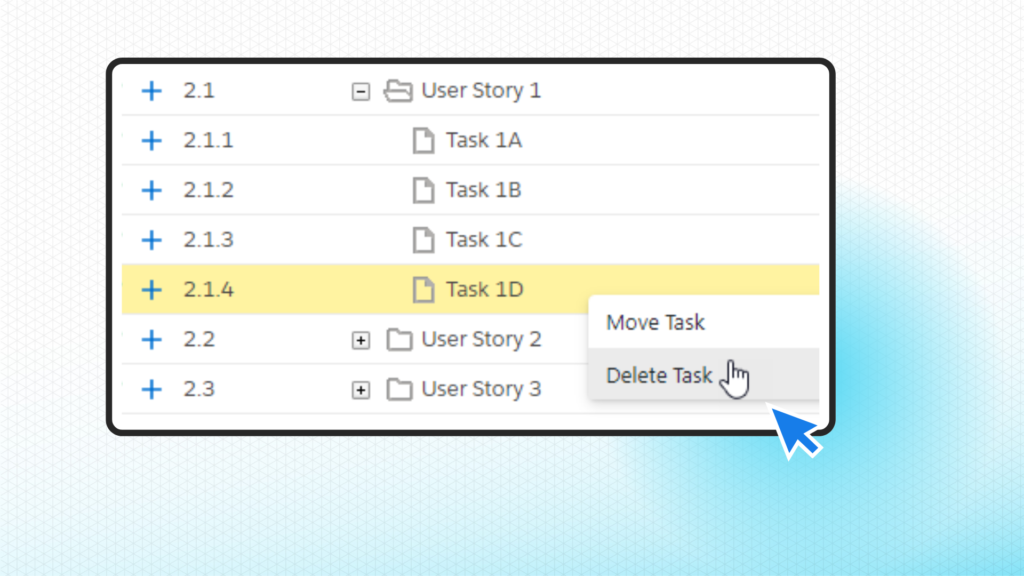
Delete Task from Workspace Right-Click Menu on Klient PSA

Get More with These New Task Management Upgrades!

Discover our latest Klient PSA features built to improve your team’s task management capacities across projects!

  • Alignment of Project Assignments and Task Assignments: We made some improvements to the behaviour of Project Assignments and Task Assignments so that your data stays aligned when updates are made.
  • Delete Task from Workspace Right-Click Menu: You can now easily delete Tasks on Klient PSA using the new right-click menu option in the Project Workspace.
  • Task Hours and Health Indicators: We added fields to the Klient Task object that now allow you to display colour-coded indicators for the status of your tasks.

Learn more about these features in our Release Notes section.

YA
Yanick Abraham
CEO of Klient. 20+ years in the Salesforce ecosystem, leading product vision at Klient PSA. He measures success by one thing: customer happiness — which is why the product never stops improving.
Connect on LinkedIn
About Klient PSA: Klient runs your entire services business inside the Salesforce you already own — projects, resourcing, time, and billing on one platform, with live margin on every engagement and no data to sync. Explore the Salesforce PSA built for professional services.

See Klient PSA in action.

Book a 30-minute demo. Go live in 3 weeks.

$39/user/mo 3 wks go-live 100% Salesforce native