A new delivery model for professional services automation
Headless Project Delivery
Delivery without the wait in between.
- Your client drives
- Agents execute inside Salesforce
- Your experts direct and approve
The waiting is what disappears.
Built for professional-services firms of 50 to 1,000 people. Typically live in about three weeks. From $39 per user per month — and you don’t need to already own Salesforce, because we provision the org and the licences.
Book a Demo →or get the playbook first
4.96/5 on the Salesforce AppExchange · 4.5/5 on G2

The new way to deliver software. The new way to deliver consulting.
What it is
Headless Project Delivery is a delivery model where your client drives the work from inside the project itself — the same Salesforce records your team uses — AI agents do the execution, and your experts direct them and approve what ships. It’s headless because delivery no longer routes through one person to reach the client. Work moves at the speed of decisions, not handoffs.
It runs on Klient PSA, the Salesforce-native professional services automation platform, with nine Agentforce agents working as resources on your projects.
| How it works today | Headless Project Delivery | |
|---|---|---|
| What your client sees | a slide about the project, on Friday | the project itself, right now |
| Who picks up the work | whoever frees up next | an agent, the moment it is ready |
| Work that is ready to ship | waits for a reviewer’s calendar | waits for one decision, on an Outcome Review |
| Getting an answer | three follow-ups and a nudge | the question is in the project, where they already are |
| The weekly status report | someone writes it every week | nobody writes it — they can already see |
| What sets the pace | calendars and handoffs | decisions |
| Where AI cost lands | a separate AI dashboard | the same place you already read project margin |
What is all that waiting actually costing you?
Not the work — the waiting between the work. It is the cost nobody puts a number on.
- The status report, written so the client can see a project they can’t see into.
- The chase — three follow-ups to get the answer that unblocks one task.
- The next available slot — work that’s ready, waiting on a reviewer’s calendar.
- Signed but not started. The most expensive silence in services.
Across the industry that waiting shows up as slippage. SPI Research puts on-time project delivery at 73.4%, down for three straight years; project overruns at 11.3%; and EBITDA margins at 9.8%, a five-year low. Two more numbers put the lag in your own currency: scope creep averages 37% across professional-services projects, and about 20% of billable hours go unrecorded every week — a fifth of the week’s billable time never invoiced, because nobody wrote it down while the work was happening. SPI Research, 2025 Professional Services Maturity Benchmark; PMI, Pulse of the Profession 2024; Tribes.ai research, 2023.
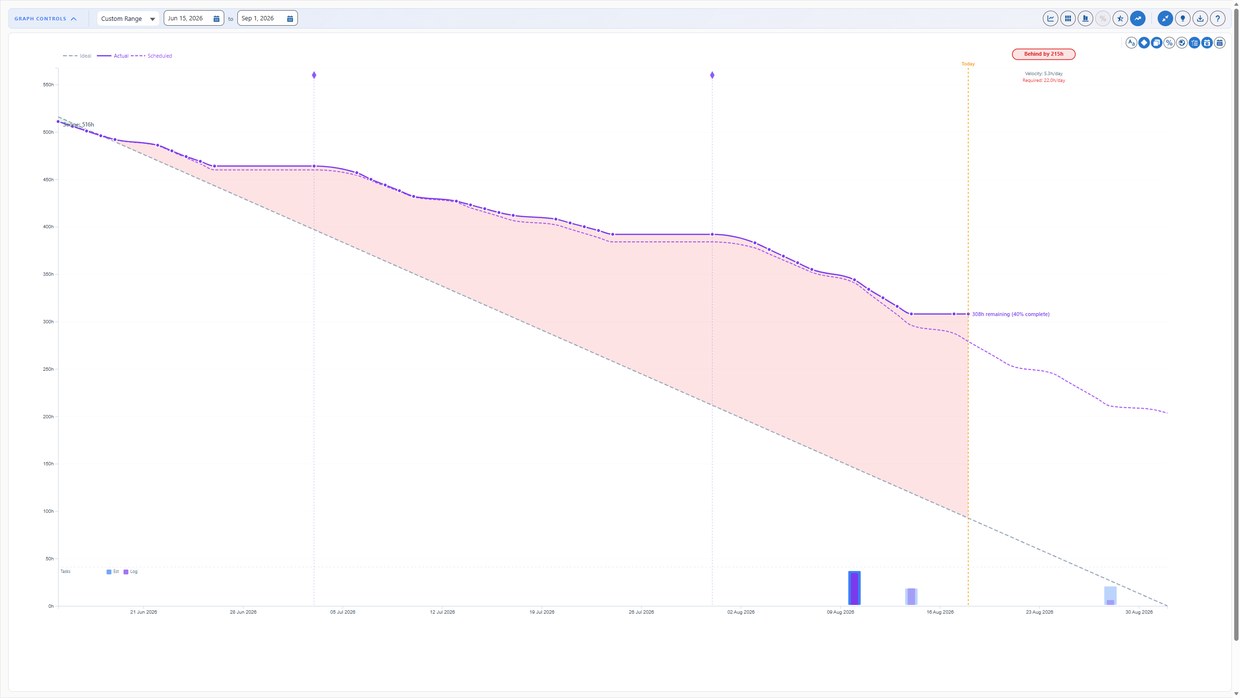
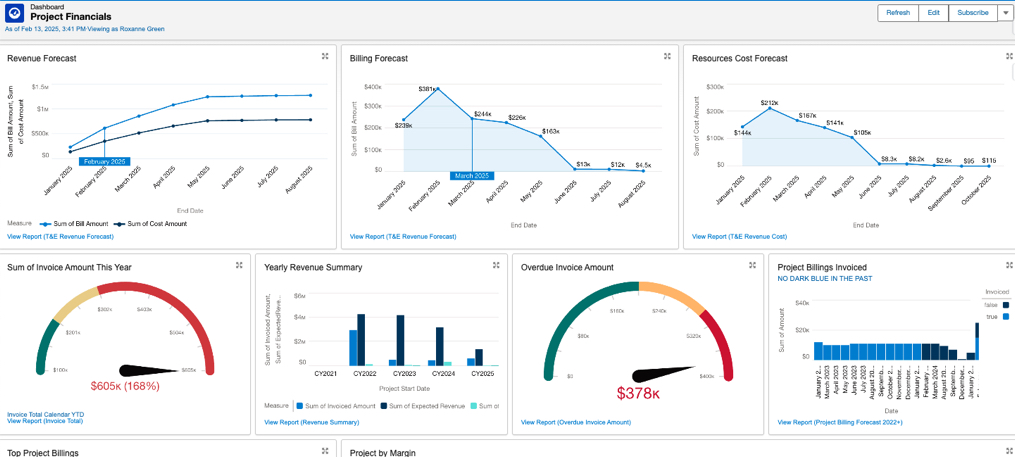
Both are live Klient PSA views — click either one to read it full size.
What does Headless Project Delivery look like on a real project?
Two businesses, side by side. Every step is the same underneath — the agent does the work, a person approves it.
Kickoff → closed case
A consulting firm
One engagement, with the nine agents working as resources on it.
-
 SCOPEY1It starts with your client.
Your client describes the work in a normal conversation. SCOPEY1 asks one question, writes the scope properly, and builds the project and its tasks from it. You approve before anyone logs an hour. More on SCOPEY1 →
-
 STAFFY1The gaps show. You staff them.
It shows who is overloaded, who has room, and which tasks have nobody on them — then suggests who fits, and why. You make the call. It never assigns anyone itself. More on STAFFY1 →
-
 PLANNY1You know if you are on track.
A short brief before your day starts: what moved, what is stuck, what needs you. Again at night, plus the week ahead. Everyone on the project gets it, not just the PM. More on PLANNY1 →
-
 DEVY1The build gets dispatched.
It hands the plan to your coding agent, watches the work, and brings the result back for you to accept or reject. This is the headless part, literally. Works with Claude Code, Copilot or Cursor. More on DEVY1 →
-
 KNOWWY1Custom work ships documented.
Consulting builds custom work and documents it last, or never. KNOWWY1 works beside DEVY1: what gets built gets written up, published and versioned — so the next engagement reuses it instead of rebuilding it. More on KNOWWY1 →
-
 GUIDY1Onboarding runs between meetings.
Onboarding dies in the gaps, not on the kickoff call. GUIDY1 watches the plan daily, nudges whoever is late, and escalates if go-live is at risk. More on GUIDY1 →
-
 TIMEY1Time stops being chased.
It drafts the week from the schedule and from where the work actually happened — calendar, email, Slack. Fifteen seconds to approve. No Friday scramble. More on TIMEY1 →
-
 TOUCHY1Every meeting updates the plan.
Before the call: a brief for you, to-dos for each attendee. After it: the transcript read, tasks updated, dates shifted, recap drafted. Nothing reaches the client until you approve it. More on TOUCHY1 →
-
 CASEY1Issues land with their cost.
The case routes itself by your rules onto that client’s support project, so the hours have a home. Past cases and articles surface automatically, and the draft reply carries a confidence score. More on CASEY1 →
What you gainThe hours that went into status reports and chasing updates move into judgment, design and the client relationship — the parts clients pay a premium for.
Customer idea → adopted release
A software company
One release, with the same nine agents. This is how we build Klient PSA — we run it on ourselves first.
-
SCOPEY1Your customer scopes their idea.
They describe what they need — no form to fill in. SCOPEY1 asks one question, writes it up properly, then checks it against your real code and docs so what lands is buildable. More on SCOPEY1 →
-
STAFFY1It gets an owner and a sprint.
Who has room, which stories have nobody on them, and what would slip the release. It proposes; you assign. More on STAFFY1 →
-
PLANNY1The release reports on itself.
What moved, what is stuck, what needs a decision today — read from the project, not from a stand-up. More on PLANNY1 →
-
DEVY1It goes to your coding agent.
The plan goes to your coding agent through MCP1 and comes back as an Outcome Review. Every change is analysed and the findings sent to whoever owns it — report only, it never pushes on its own. More on DEVY1 →
-
TIMEY1You know what the release cost.
Dev time lands on the release from the schedule and from where the work happened. Fifteen seconds to approve. Cost per feature stops being a quarter-end guess. More on TIMEY1 →
-
KNOWWY1It ships documented, not later.
Feature reference, admin guide, release notes — written and published as knowledge articles. Nothing goes live without a person approving it. More on KNOWWY1 →
-
TOUCHY1Calls turn into project updates.
Before a customer call, TOUCHY1 briefs you on status and open items. After it reads the transcript, updates the tasks, shifts the dates and drafts the recap — sent once you approve it. More on TOUCHY1 →
-
GUIDY1Onboarding gets followed through.
GUIDY1 runs the onboarding project day by day: every task tracked against the plan, whoever is late nudged, statuses moved, and go-live escalated the moment it is at risk. More on GUIDY1 →
-
CASEY1Cases land with their cost.
Routed by your rules onto that customer’s support project. Past cases surface, the draft reply carries a confidence score — and anything that turns out to be a real gap becomes the next request, back at step one. More on CASEY1 →
What you gainWhen execution stops waiting for someone to be free, more of the roadmap actually reaches customers — and new accounts get to value before their confidence drains.
The monthly releases are very welcome because they are full of new features as well as bug fixes.Frank Waninge, a seven-year Klient customer — AppExchange, 5/5

The same gate sits at the end of every step above. The agent produces the draft, the plan, the reply, the article — and stops. Publishing it, sending it, deploying it: a person decides that, on an Outcome Review. Nothing reaches your client because an agent thought it was ready.
Agents are one half. You driving it is the other.
Two ways to work headless. Most teams use both. The agents run on their own: assigned to tasks, each doing the one job it was built for, with every output waiting on an Outcome Review. MCP & Skills are attended — your own AI client acting on the org while you drive, with no screen in between.
You drive it
MCP & Skills
For the people who would rather type than click.
Your AI client — Claude, Cursor, Copilot — acts on your Klient PSA data directly. There is no script and nothing is off-limits: whatever Klient PSA can do, your AI can do, limited only by what your Salesforce login is allowed to see. It runs on your own machine, against your own org.
What it costs: $1,000 one-time per product, per company. A perpetual licence, no subscription, no per-query cost, no Flex Credits, unlimited users.
Best forPower users who would rather type one sentence than open five screens — and admins who need an answer to “why can’t they see that?” right now.
It runs on its own
The nine agents
For the work that should not wait for you.
Each agent is a resource on the project, doing the one job it was built for, inside your org’s permissions, sharing rules and audit trail. It acts on its own schedule — and stops at the Outcome Review, where a person decides.
What it costs: $1,000 one-time per agent, then tokens as it works, billed as Salesforce Flex Credits.
Best forEverything that used to sit in a queue waiting for somebody to be free — the status report, the scope, the nudge, the recap, the timesheet.
Eight products, each licensed once:
Both land in the same place. Whichever you use, the work arrives on the same projects, tasks and timesheets — visible and auditable in Salesforce. Most teams run both.
Why nowSalesforce made the platform callable with Salesforce Headless 360, and Salesforce and Anthropic put the CRM itself inside Claude with Claudeforce. The direction is settled: the work gets driven from an AI client, not from the screen. Claudeforce does it for the sales side. We shipped the delivery side first.
What does it actually return?
Klient is Customer Zero: every agent ran on our own delivery before it ran on yours. The approval gates in the product are not a safety feature added afterwards — they exist because we measured what happens without them. A fast agent and an unready approver just moves the backlog somewhere else.
Documentation
150–200 hours a year
of senior analyst time back. KNOWWY1 sits on the documentation task of every feature project: it reads the merged pull request and the deployed config, then drafts the reference, the quick start, the admin guide and the release notes — staged for a person to approve. At 50 features a year and three to four hours each, that is time an analyst no longer spends writing from memory.
Onboarding
Go-live on the date
not when someone catches up. GUIDY1 and TOUCHY1 run a 45-day onboarding template. GUIDY1 reads the plan every day and drafts the nudge when a task stalls; TOUCHY1 updates the project after every call. The CSM keeps the relationship. The agents keep the plan.
Roadmap
No cycles on features nobody asked for
customers decide, not the loudest voice in the room. Customers submit and vote on ideas in our Feature Hub; our own team adds an interest score. The combined signal decides what gets built, and every shipped idea links back to its knowledge article, so the customer sees the loop close.
Senior-time figure based on three to four hours per feature at 50 features a year; results vary with team size and documentation volume.
What that means for you: you are not the experiment. The approval step exists because we ran without one first and found out what happens — so you get the version that already has the fix.
Want to see this on your own projects? Book a demo → Thirty minutes, your delivery model, and where your lag actually is. Or read the playbook first.
Agents log their hours. Tokens are what they cost.
An agent is a resource on the project, so it logs hours to a timesheet the same way a person does — that is your reporting: effort, utilisation, what actually happened. The cost is the tokens. Token consumption is what Salesforce bills as Flex Credits, purchased directly from Salesforce. Both land on the project, so AI cost sits on the project next to your margin, not in a separate AI dashboard.
Knowing what a task actually costs to deliver — people and AI together, before you quote it — is also what makes pricing an outcome practical rather than brave. You can price the deliverable instead of the hours it takes, because you already know the margin.

The nine AI agents — each one a resource you assign, schedule and approve — plus MCP1, the live connection that lets any AI work on your project data.
- SCOPEY1
- PLANNY1
- TIMEY1
- STAFFY1
- CASEY1
- GUIDY1
- TOUCHY1
- DEVY1
- KNOWWY1
 MCP1
MCP1
One person now ships what used to need a chain of them.
What people ask first
What is Headless Project Delivery?
Headless Project Delivery is a delivery model where your client drives the work from inside the project itself — the same Salesforce records your team uses — AI agents do the execution, and your experts direct them and approve what ships. The name comes from headless architecture: delivery no longer routes through one person to reach the client. Headless is not leaderless — your experts still direct the work and still approve everything before it reaches the client. They simply stop being the queue it waits in.
Is this the same as Salesforce Headless 360?
They’re related but not the same. Salesforce Headless 360 makes the platform itself browserless — every capability reachable as an API, an MCP tool or a CLI command, so AI clients can act on your org directly. Headless Project Delivery is what that makes possible for a services business: because the work can happen without a screen in the middle, it can also happen without a queue of people in the middle. Klient PSA runs on Salesforce and ships MCP1, so the two fit together directly.
Do we need Salesforce already?
No. Klient is a Salesforce OEM, which in practice means we provision the org and the Salesforce licences as part of your subscription — they are included in the per-user price, not bought separately. If you already run Salesforce, Klient PSA installs into the org you have and your existing data, objects and permissions stay exactly as they are.
How fast can we go live?
Typically about three weeks, from kickoff to running real projects on Salesforce. Week one is configuration and your data; week two is your delivery process, rates and approval rules; week three puts the agents on live projects with your people approving their output. Klient PSA is native to Salesforce, so there is no separate platform to stand up — and the Salesforce licence is included, so you do not need to already own one.
What does it cost to run agents on a project?
The two halves are priced differently. Each agent is $1,000 one-time with no subscription, and its ongoing cost is tokens, billed as Salesforce Flex Credits and purchased directly from Salesforce. MCP & Skills are $1,000 one-time per product with no subscription, no per-query cost and no Flex Credits at all. Either way, the hours logged to the timesheet are for reporting, not billing — they tell you effort and utilisation — and because the work lands on the project, cost per task includes AI cost in the same place you already read project margin rather than in a separate AI dashboard.
We bill by the hour. Doesn’t this cut our revenue?
On fixed-fee and milestone work it does the opposite: the effort drops, the price doesn’t, and the margin is yours the day it ships — no repricing, no new contract.
On time and materials, the honest answer depends on your pipeline. If demand is flat, faster delivery shrinks the invoice. If it isn’t, the same headcount carries more projects, and revenue per person rises instead of hours per project.
The bigger change is the mix. The hours that disappear are the cheapest ones — status reports, chasing updates, re-keying the same information, writing documentation from memory. What stays is scope, judgment, design and the client relationship, and those bill at your highest rates. Your blended rate goes up as the hours come down.
It also makes outcome pricing practical rather than theoretical: when cost per task already includes the AI, you can quote a deliverable and know the margin before you sign.
Won’t my clients resist doing the work themselves?
They’re not asked to do the work — they’re asked to see it, decide on it and approve it, in the system where it’s happening rather than in a slide about it two weeks later. Worth noticing that clients already do work in the old model: chasing updates, re-explaining the same context, sitting through status calls that exist because nobody can see the project. Headless Project Delivery trades that low-value client work for real control.
Will AI replace project managers?
No — but the job changes shape. Today a PM spends most of the week finding out what happened: collecting status, chasing updates, re-entering the same information in a second system. The agents do that now. What’s left is deciding what happens next — which work the agents pick up, what “done” looks like on this project, what’s stuck and why, and what gets approved before it reaches the client. Scope calls, risk judgment and the client conversation stay human. The PM stops reporting on delivery and starts running it.
Will AI replace consultants?
No — the job moves up a level. They set the brief, direct the agents, review the output and own the result in front of the client, including the deliverables that used to need a separate analyst, writer or designer. Execution moves to the agents; judgment, design and the client relationship don’t. The job moves up a level: from doing the tasks to producing the outcome.
Will AI replace developers?
No — the developer owns more, not less. They own the full lifecycle of what they ship: the code, the documentation, the screenshots, the release video — work that used to route through three other people and three more weeks. They set the constraints, direct the agents, review what comes back and decide what ships. Volume of code was never the point. Owning the finished thing is.
What do I need to run it?
Salesforce PSA from Klient, from $39/user/month with the Salesforce licence included, plus the nine Agentforce agents and MCP1. The agents work as resources on your projects — assigned to tasks, supervised by your people, with every output reviewed before it ships. Built for professional-services firms of 50 to 1,000 people.
Not ready for a demo? Get the Salesforce PSA + AI Agents playbook instead — how the model works, how your people stay in control, and the three-week go-live path. One email, no sales call.
See it on your own projects
Thirty minutes, your delivery model, our agents. We’ll show you where your lag actually is.