Rosalie and Yanick walked through Klient PSA 51.14 live: overdue dates in red and the “Unassigned” filter in the Project Workspace, your own column order, faster paste, Ready to Work in My Deadlines, preset sharing and Save & Close, the Invoice Date in Generate Invoice, and the new Survey Explorer. Then came the 51.15 beta (Revenue Recognition v2 and per-line invoice tax), Klient PSA for Sales with SCOPEY1 building the estimate, SCOPEY1 on the AppExchange, SKILL Migration1, the Feature Hub and what’s coming in 51.16.
Webinar chapters
00:00 Welcome
01:26 Agenda: 51.14 at a glance
02:47 Project Workspace: overdue dates in red + Unassigned filter
04:57 Assignment View: personal column order
05:56 Faster task insertion and copy/paste
06:41 My Deadlines: Ready to Work
08:57 My Deadlines preset sharing + Save & Close
10:29 Generate Invoice: pick the Invoice Date
11:39 Survey Explorer
16:19 51.15 beta: Revenue Recognition v2
21:46 51.15 beta: per-line invoice tax
22:59 Klient PSA for Sales: Service Estimates
30:41 SCOPEY1 inside Service Estimates
33:23 Q&A: estimating hours from past work
37:28 SCOPEY1 on the AppExchange
38:40 SKILL Migration1
40:00 Feature Hub updates
42:57 What’s coming in 51.16
43:42 G2 reviews, Amsterdam, next webinar
45:26 Wrap-up
What’s new in Klient PSA 51.14 01:26
51.14 was released last week. Four of its new features came straight from your ideas on the Ideas Exchange, and three have an upgrade consideration, meaning your admin has a step to take after upgrading: look for the 🚨 in the release notes. Here is everything we demoed.
Project Workspace: overdue dates in red, and “Unassigned” in the Assignees filter 02:47
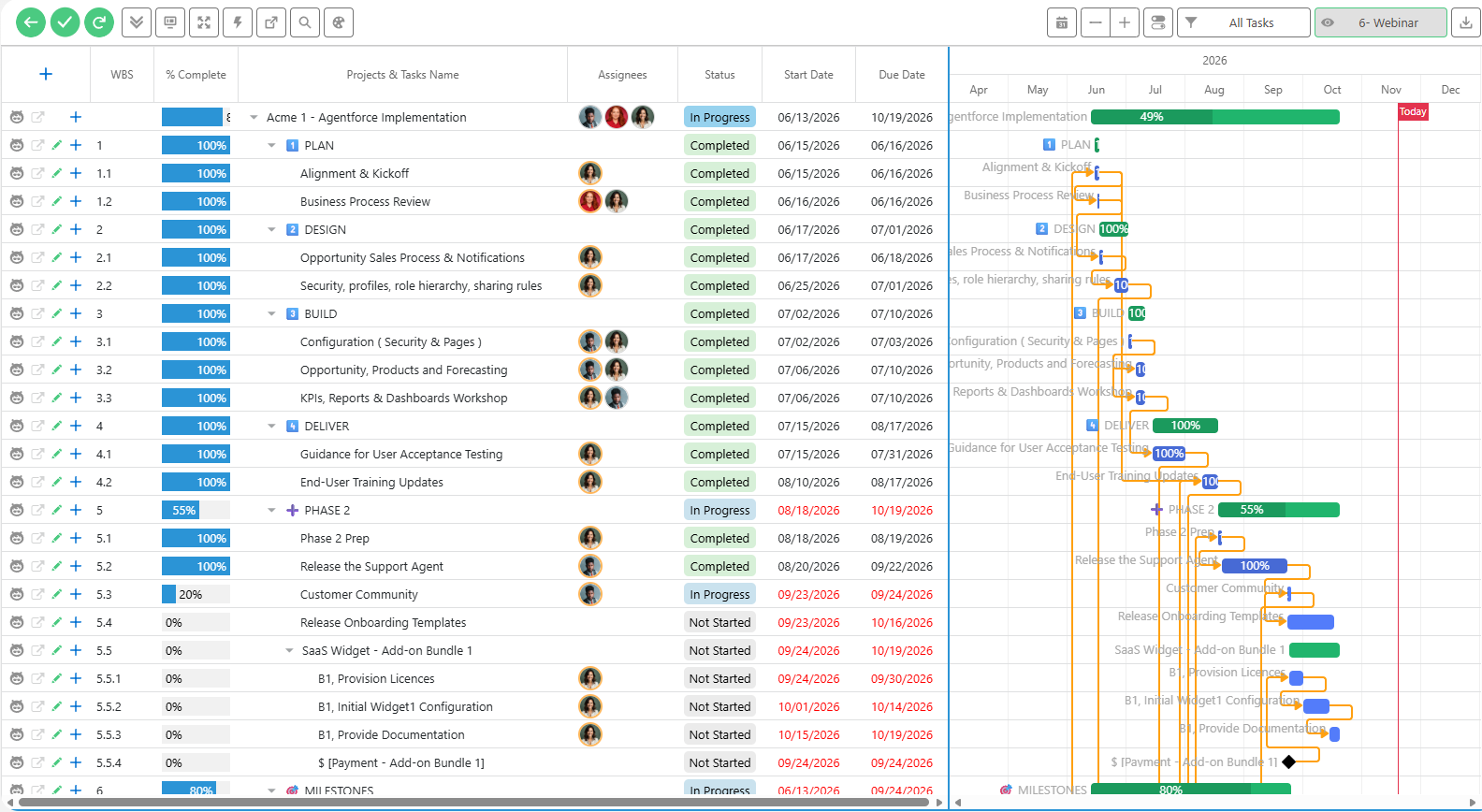
Past-due dates now show in red in the workspace grid, so a late go-live jumps out. Completed and canceled tasks stay black: only work still open turns red. It was one of the most voted ideas, and there is no column to add and no setting to turn on. A new “Unassigned” option in the Assignees column filter lists every task with no one on it, which is often why it is late. Overdue dates in red · Unassigned filter.
Assignment View: your own column order 04:57
Reordering the assignee columns in the Assignment View is now saved per person and per project, so a colleague’s layout no longer reshuffles yours. With 20 people on a project, that matters. You can also save it in a preset. Open it from the screen icon in the workspace toolbar. Personal column order release note.
Faster task insertion and copy/paste 05:56
Inserting tasks and pasting several at once (Ctrl+C, Ctrl+V) is much faster in the workspace grid. If you copy tasks a lot, try it and tell us if you notice the difference. Release note.
My Deadlines: Ready to Work 06:41
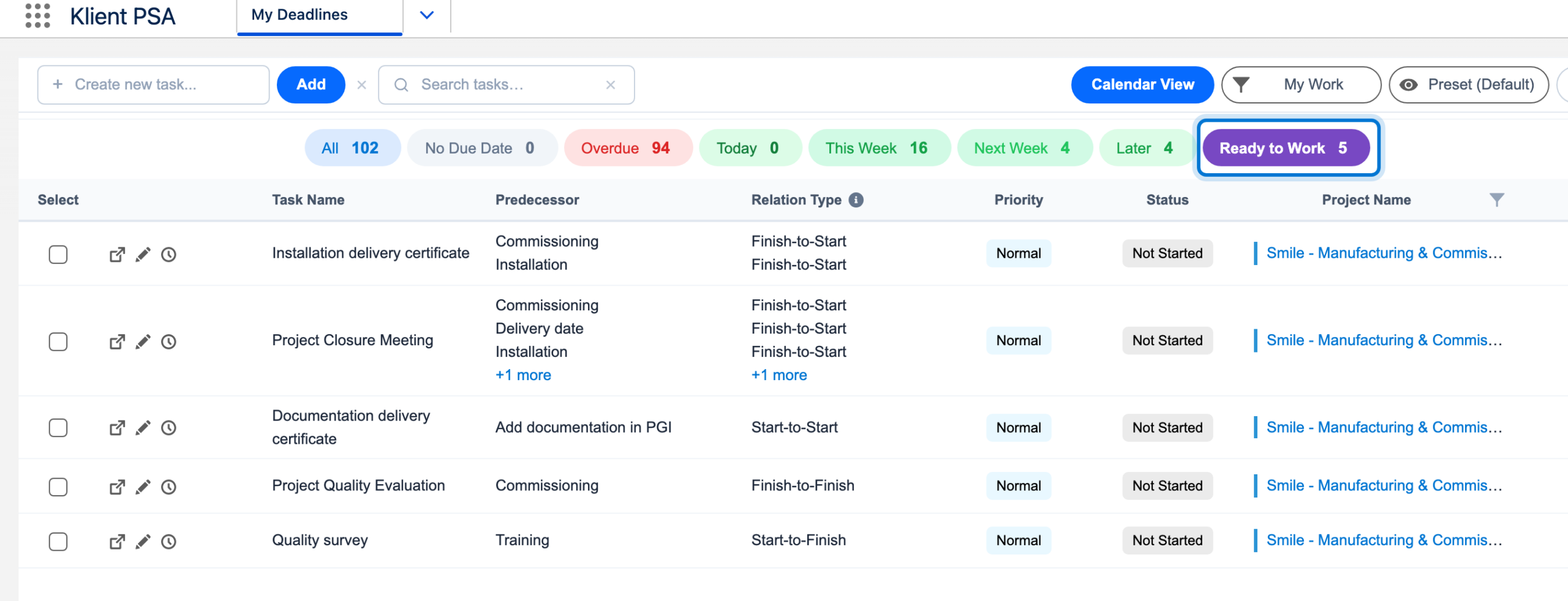
A new Ready to Work pill in My Deadlines lists the tasks whose predecessors are all completed, so you can start now, even if the task’s scheduled start date is days away. Move a predecessor back to In Progress and the task leaves the list again. Rosalie called it a more proactive to-do list than waiting for the schedule to catch up. Ready to Work release note.
My Deadlines preset sharing, and Save & Close in the Task Side Panel 08:57
Presets in My Deadlines can be shared again: with roles, with all your resources or external resources, or with a list of people you pick. And in the Task Side Panel, Save & Close now appears in the header as soon as you edit a task, so you no longer scroll to the bottom to save. Rosalie’s favourite of the release. Preset sharing · Save & Close in the header.
Generate Invoice: pick the Invoice Date 10:29
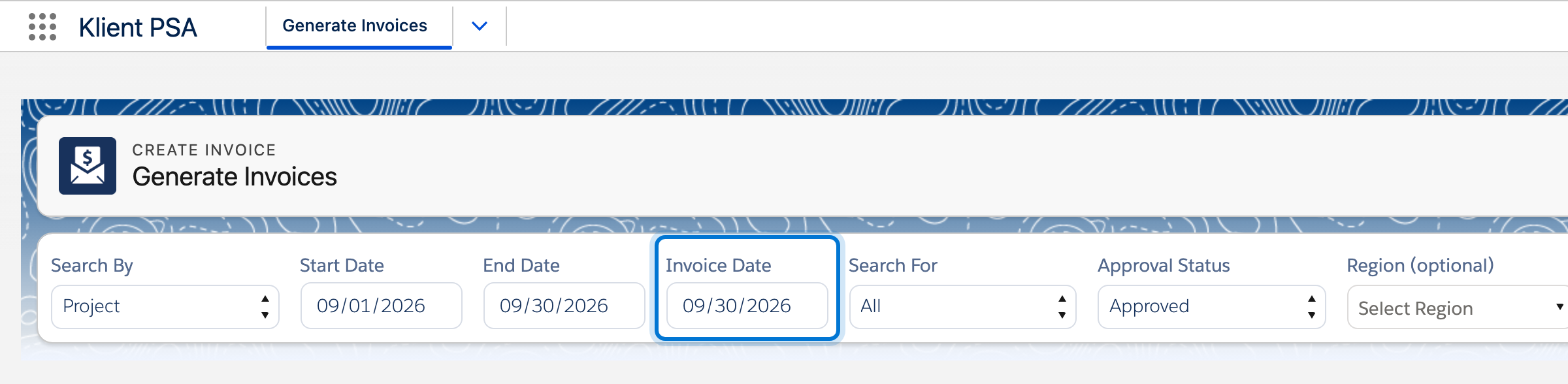
Generate Invoice now has an Invoice Date picker: choose, say, November 1, and every invoice you generate is stamped with that date. Before, invoices were dated today and you fixed them one by one or in a list view. A big time saver if you invoice a lot. Invoice Date release note.
Survey Explorer 11:39
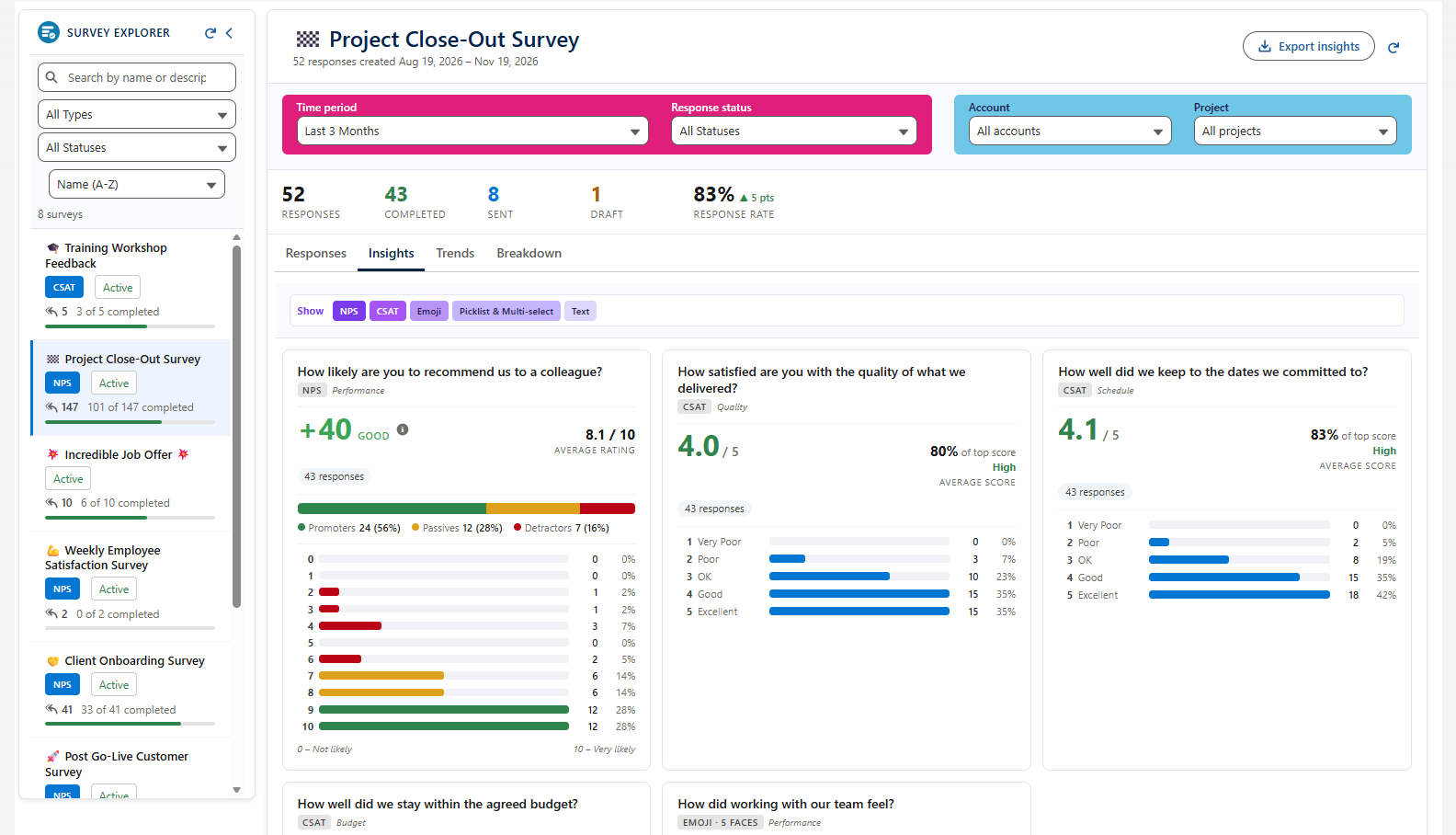
The highlight of 51.14, and a long-requested one: a single place to read your survey results, built by Alex on our team. Pick a survey from the list (search or sort by most responses), filter by period, status, account or project, and see the response rate and every answer. The Insights view charts CSAT, NPS, emoji and text answers; Trends shows how response rate and sentiment move over time; and the breakdown by account, project or project owner helps your customer success team find detractors and act. Export the results from the top of the page. Upgrade consideration: give your users access to the Survey Explorer tab, as described in the release note. Survey Explorer release note.
51.15 beta: try it first
51.15 is a short release squeezed in between two others, and you can try it before everyone else. It is in beta now, with general availability planned in December.
Revenue Recognition v2 16:19
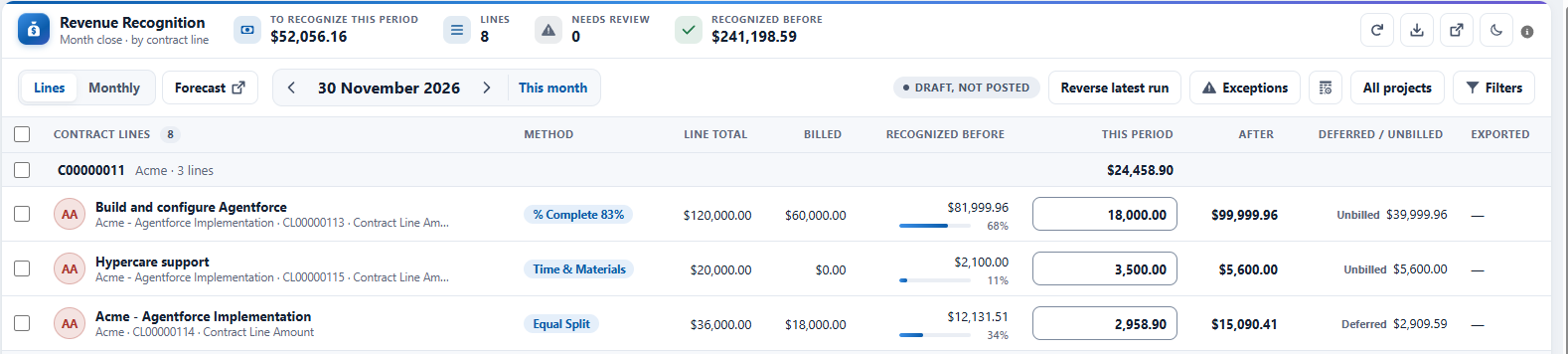
Revenue recognition was always in Klient PSA; v2 rebuilds the engine. As more services work moves to fixed fee and mixed models, it is no longer just for SaaS businesses. It now starts from the contract and its contract lines, with revamped revenue templates (fixed fee by hours, subscription daily, time and materials, and more). A Klient Insights dashboard sits right on the contract, with revenue by month and projected revenue. In the engine you review what can be recognized this month, adjust a line (a reason is now required), post the lines and close the month, then export the posted lines as a journal formatted for your accounting platform. Because it touches accounting, try it in a sandbox first. 83% of the attendees we polled don’t use revenue recognition in Klient today but said this could change. Revenue Recognition v2 release note · Watch the Revenue Recognition overview.
Per-line invoice tax 21:46
Tax used to be applied on top of the invoice. In 51.15 it can be calculated on each line, so you can make a line tax-exempt and the totals stay correct, without the rounding issues and manual fixes some customers had. Existing customers keep the current mode unless they turn the new setting on.
Klient PSA for Sales: Service Estimates 22:59
Klient PSA for Sales is a separate add-on ($15 per user per month) for the people who estimate and sell services. Salespeople who don’t have a Klient PSA license can use it on its own: they build estimates and see the projects they sold, without timesheets or task updates. In our poll, 60% of the teams estimate services with Salesforce quotes or CPQ, and 20% with spreadsheets.
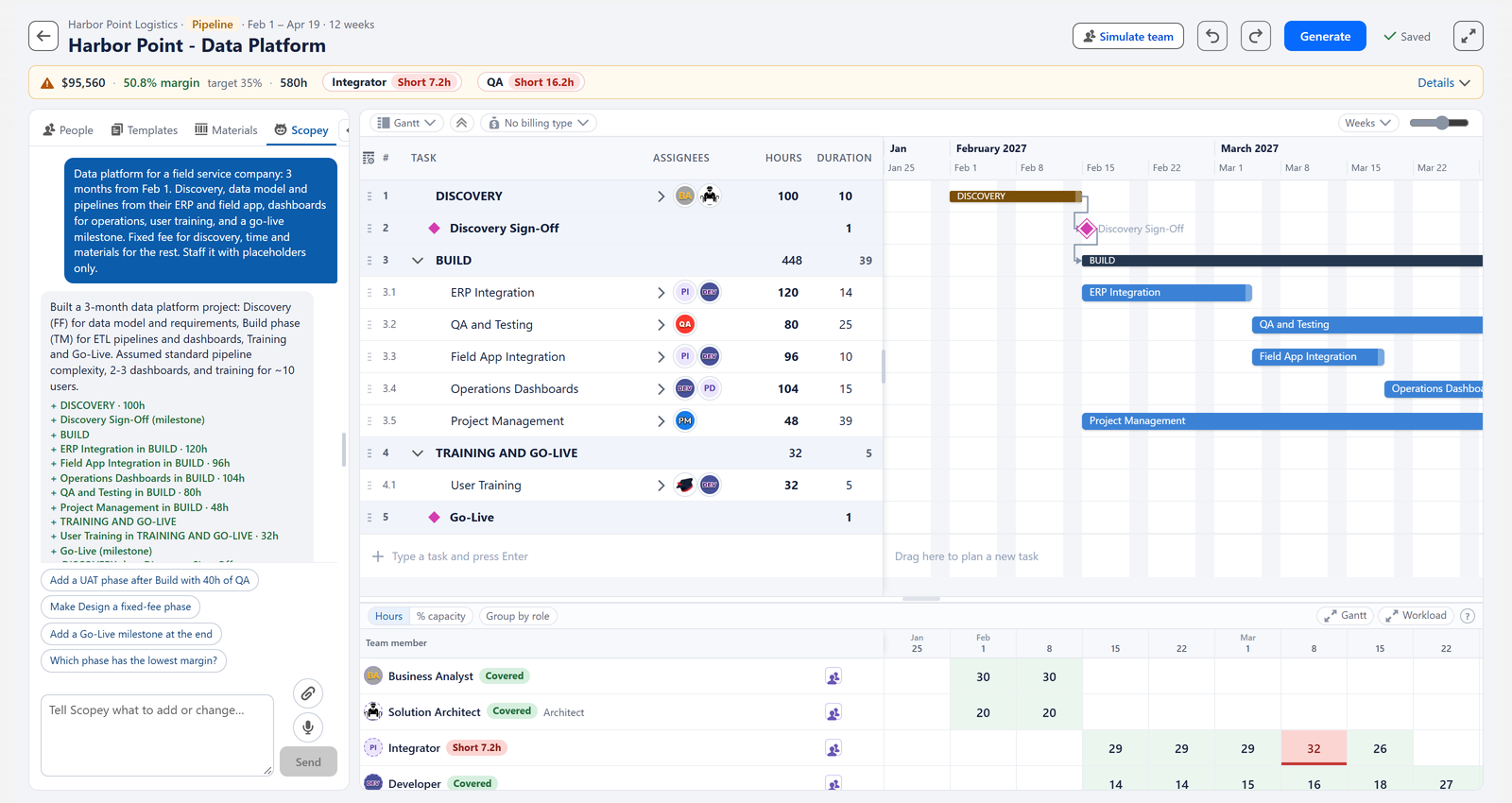
Yanick built an estimate from scratch, live: add a phase, pick a role, choose a schedule shape (front-load, ramp-up) and the hours spread over the dates. Underneath, an estimate is a Klient pipeline project, so you can start from any template or past estimate, or from an opportunity, Salesforce Revenue Cloud or a proposal. The bottom panel tracks margin against your target as you go: the demo estimate was at 58% against a 35% target, and Simulate team suggested lower-rate resources that took it to 76%. Rate cards and required skills apply, and each person’s availability for the coming weeks shows in green or red. When the deal is won, the estimate becomes the delivery project.
SCOPEY1 inside Service Estimates 30:41
From the side panel, Yanick asked SCOPEY1 in plain words to “add another section for on-site training in the three biggest cities of the UK for 2-day full-time training”. It added the phases, the resources and the dates, and Undo took them out again. When the added training overloaded the trainer placeholder by 168 hours, the plan turned red, before anything was sold. Want a longer demo for your sales team? Reply to our follow-up email.
SCOPEY1 is on the AppExchange 37:28
SCOPEY1, our business analysis agent, is now live on the AppExchange. Describe what you need in plain words; it helps you scope the project and, once you approve, builds it with all its tasks. Get it from My Products on the Feature Hub, where the setup documentation is too.
SKILL Migration1 38:40
If you use the Klient PSA MCP, or plan to, SKILL Migration1 brings your data into Klient PSA from another tool: Smartsheet, spreadsheets and other systems. It asks which system you come from, connects to the ones it already supports, or reads any Excel or CSV file, maps the columns for you and pushes everything into Klient. Useful for new customers, and for existing ones who still keep surveys, expenses or to-dos somewhere else. Get it from My Products.
What’s new on the Feature Hub 40:00
Here’s what changed on the Feature Hub since the last webinar:
- Release timeline on the home page and the release notes page: current, past and next versions with their dates, so you can plan your upgrades. Hover a dot to see what’s coming.
- KLARA, updated: better answers, she can still open a case for you, and a short survey after each chat.
- eLearning, simpler: one list of every course, with filters (Team Member Essentials is a good start for anyone new).
- Ideas Exchange, clearer: four stages, Voting → Planned → In Development → Live, a filter for new ideas this month, and the version each live idea shipped in. Vote or submit an idea; right after an upgrade is the best time.
New to the Feature Hub? Log in here.
What’s coming in 51.16 42:57
- Klient Insights: Early Warning & Forecast
- Resource Planner: a modern look
- Skills Matrix: makes it much easier to start using skills in Klient
- Kanban: manual sort
Frequently asked questions
How about translations for surveys: is this supported, or do we need different surveys for each language?
The survey interface is translated, but the questions themselves are not, so you need one survey per language.
How do I get the Survey Explorer?
Upgrade to 51.14, then give your users access to the Survey Explorer tab: that is its upgrade consideration, described in the release note. If you don’t send surveys yet, the Feature Hub documentation walks you through setting them up, or ask KLARA.
Can I try Revenue Recognition v2 now?
Yes, it is in the 51.15 beta. Because it is a major change for accounting, try it in a sandbox first. Reply to our follow-up email and we’ll send you the upgrade link.
Is Klient PSA for Sales part of Klient PSA?
No, it is a separate add-on. It works on top of your Klient PSA licenses, and salespeople without a Klient PSA license can use it on its own to build estimates and see the projects they sold (no timesheets or task updates). Reply to our follow-up email for a demo for your team.
Are there tools to help estimate how many hours are needed for the tasks (possibly based on what’s been previously worked)?
Yes. SCOPEY1 estimates the work for you, and if you point it at your past templates or projects (“look at these closed projects”), it uses them to fill in the estimate; otherwise it estimates the rest itself. In Klient PSA for Sales, Service Estimates then shows where you are short of people: in the demo, the plan turned red when a trainer placeholder was 168 hours over.
Join us next time 43:42
Next week, on November 26, we’ll be at the Agentforce World Tour Amsterdam to demo everything you saw today. Our next product update webinar is earlier than usual because of the holidays: Thursday, December 10, 11 AM ET, with our agents at work and a lot of AI. Register for December 10. Using Klient PSA? Leave us a review on G2.
Get the slides
Free download
Download the webinar deck
Get the full slide deck from this session — we'll email it straight to your inbox.
PDF · free · no spam
Rosalie Chassat: Hi, everyone, and welcome to our November Product Update webinar with Klient. Thank you so much for being here. Today we’re mostly talking about version 51.14 that was released last week, plus a few more things that we’ll get into in the agenda. Alright, so who do we have with us today? I’m Rosalie, Customer Success Manager at Klient. I will be your host today, as always. By the way, we’re live from Montreal slash Laval slash around Montreal area in Quebec, in case you’re wondering. Very, cold normally this time of year, but somehow today we have sun and it’s hot, so probably the last day of the year. Yanick, our CEO, is joining me today as well. Hi, Yanick!
Yanick Abraham: Rosalie! Yeah, I can say I’m excited about the winter coming, but, yeah, I’m doing some skiing, going skiing will be nice, but, yeah, not ready yet.
Rosalie Chassat: And we have Nathalie. If you are a person that joins often a webinar, you will notice we changed Nathalie’s name, so Product Support and Enablement Advisor, as of today. So, hi Nathalie, she’ll be on the chat answering your questions. As a reminder, please send your question in the chat, in the Q&A, use the reactions, and we’ll have a couple of polls along the way. Let me just get started with the first poll. We want to know if this is your first Klient webinar. Or if you’re a regular, or if you’ve been to just a few. Just take a few seconds, it helps us know who’s there today. And, yeah, perfect. I’ll let the pool on the side. Okay, so let’s have a look at what we have in store for today. First up, we’ll talk about 51.14. This is the full list on two pages of all the features, improvements, fixes that are released. Four of those have a little light bulb, which means they came from your ideas. We also show which one have, upgrade consideration, the little, light emoji. All the ones in bold with a little camera film movie, I don’t know how you call that, means we’re gonna demo these today. And they all have a direct link to the release notes. Alright, okay, perfect. We’re also giving you a first look at 51.15, which is now available in beta. It is a very sh… whoops, let me just go back. It is a very, short release that we squeezed in between two other ones. Main thing is revenue recognition revamp, so big thing there. We’re gonna show you that in details. And a couple of other things in that release as well. We’re also gonna show and talk a little bit about SCOPEY1 and the skill migration that are now available. And then, we did mention it in our communications, we will give you a first look at Klient PSA for Sales, which is a separate product for, helping with service estimates, so we’ll get into that. And then at the end, we talk a little bit about what’s new in the Feature Hub, what’s coming, your ideas, few dates to save, upcoming events, etc. All right, so let’s dive into our first interface. We have a couple of cool things that were added in Project Workspace, and as the image shows, let’s get started with that, overdue dates showed in red, Yanick. I like that one.
Yanick Abraham: Yes, a lot of cool stuff that’s been introduced, so let’s go in Klient the workspace. It’s one of the last times that you see this look of the workspace. I’m not sure it’s gonna be released for the next one, but in January, you’re gonna see a new look and feel for pretty much all our interface. This being said, the functionality will remain, and the one that we’re showing today is the fact that those dates are now showing in red when you have past due information. We had things like the task indicator that was signaling overdue. We have an overdue indicator, too, so we had a lot of different aspects, but just putting, as well, dates in perspective. In this case, you can see that the go-live is in red, and we can go in our Phase 2 and just look for everything that’s in red, and you can see that completed tasks, they don’t show up, it’s really what’s in progress, or what’s not canceled that’s gonna show up if the date is past due. No, this was…
Rosalie Chassat: One of the ideas that we had a lot of votes for. No need to add a separate column or do any setting, it’s just next time people go in Workspace, they’ll see that change, so that’s great.
Yanick Abraham: Exactly. A lot simpler. Another thing also is another type of filter, so if you right-click in here, and you go Filter Assignee, and you go unassign, you’re gonna be able to see all your unassigned tasks, and maybe that’s why they are late, it’s because there’s no one assigned on it. So I should go on and go in and assign people on my task. So that’s a new filter, so if you didn’t recall, you can go in here, and you can pick some filtering on pretty much all our columns, and hiding them as well, and if you want to reset your filter, you can just clear them from top here.
Rosalie Chassat: Perfect.
Yanick Abraham: D.
Rosalie Chassat: the signies.
Yanick Abraham: Say that again?
Rosalie Chassat: Speaking of assignees, we’re switching.
Yanick Abraham: So, let’s go to the assignment grid. So, another UI that’s been revamped a lot, and that’s Karl, one of our… the main owner of this portion of our product, has been doing a lot of improvement on and rapidity and simplicity of it. And the thing that we’ve done now is that you… you used to be able to order columns, so this was working, but now those columns are going to be reordered based on your personal settings, so this way it won’t go… won’t be messed up if somebody else in the company want to readjust it, so you can easily just manage your assignee and realign them. For a team of 3 like this, it’s not a problem, but when you have 20 people on a project, it does become crowdy, and you want to be able to move your things around. Those things can be also saved in the preset. If you don’t know how to get there, you just go over that screen icon, and you select the assignment grid or assignment UI to get there.
Rosalie Chassat: Yep.
Yanick Abraham: And last thing, it’s, we’ve improved, speed across the board on a lot of our, stuff, but here, one of the things we wanted to mention is the, if you want to go ahead and do, insertion of tasks, it inserts a lot faster now, and, copy and paste as well go a lot faster, so, you can see that now I’ve just copied a bunch of, what is it, 6 tasks, 5 tasks that I’ve copied in a single copy, Ctrl-C, Ctrl-V. So, yeah, a lot faster, and yeah, this performance is always key, and we’re trying to improve that all across the globe.
Rosalie Chassat: If you’re already using the copy-paste a lot for your task, check it out, try it out, let us know if you see a change as well, so we can close the loop on that. All right, moving on…
Yanick Abraham: I won the…
Rosalie Chassat: Yeah, another interface. My deadlines. I feel like we talk about my deadlines now every webinar, and we hadn’t talked for a while.
Yanick Abraham: Yes, and this is a concept… I’m sorry, Rosalie.
Rosalie Chassat: No, we have two new things there, yep.
Yanick Abraham: Yeah, and this is a concept that we’re gonna be… start pushing a lot. It’s more kind of a concept aligned with the workflow, where when one task is over, then the next task can be, start running right away. There’s a need to wait for the scheduling, so that’s kind of the concept behind ready to work, the first thing we’re going to be looking at. So, if I open my deadline. You’re gonna see that I have nothing to do today, but I have something that is ready to work, so you have that new pill that’s gonna be added here, in your new, in this new release. And you can see that this task here, that business process review, is ready to work, meaning even if the date, the start date is not today, you can see the start date is 11-23rd, the due date is 12, only the 2nd of December, but it is ready to start working. And I’m just going to show you how it works. So it works with the dependency of the task, so if there is some dependency between your tasks. And the tasks prior, or the one or the multiple tasks prior, are completed, like, for example, this case, even if that task here, this is the one that we’re looking at, even if that task here is not scheduled yet, it’s going to be shown in your ready to work. Meaning, as well, that if I just change this and I move back in progress, let’s say it’s back to 50%, and then I go back, and now you can see it show in red, so it’s not a surprise due. If I go back in my deadline, you can see that ready to work now is back to zero, meaning that No, the previous task is not… the predecessor task is not completed. I’m not ready to work it. But this enables… there’s two ways to address this, so either showing it to you like this in the list so you can execute the work, or we could also have done some auto-rescheduling on task close, but this is a bit more… Yeah, process intent, so we’re starting with that ready-to-work list here instead.
Rosalie Chassat: I like this, maybe it’s a more proactive approach to your to-do list than just waiting for the over-to staffer.
Yanick Abraham: Yeah, exactly. Preset sharing, and then the task panel. So, on the preset side, if you haven’t used preset on the white deadline, you can start using it, and we have also added back the share, so, and you can share across, different, roles, or all your… across all your resource, or external resource, or you can specify a list of resources you want to share with. It’s the same concept we have across the board for sharing material. And the last thing is the task site panel. Let me open up a task here.
Rosalie Chassat: That’s my favorite one from this release. Yeah.
Yanick Abraham: So this is simple, so you see we have the save and close here at the bottom, and this should have been done a long time ago, I guess, but now if I just edit the task, you saw that here my save and close judge showed up, so I don’t need to scroll down to go and save my task and be able to, To resume my work. So, simple, tough, but across the board, this is the thing that we are improving. simplicity and, and removing some toggle, so you see the red, the red, dates and everything? This is, baked in, you don’t have a toggle to turn it on or off. We think that it’s gonna benefit everyone enough.
Rosalie Chassat: And this may be silly, but I didn’t personally even know that the save and close was at the bottom, so I always hit the save and X. I did not know it was there, so I just discovered the save and close option this week, so I hope some other people are having a haha moment.
Yanick Abraham: Okay. Moving on to, invoices. So, this is another one, that it’s a simple pick list here, or a simple date picker, but in terms of your process, our customer, for the people that are generating invoices, it’s gonna save a ton of clicks. So you were able to change the invoice date in the past. This being said, you needed to go into your list view. And let me open up the generate invoice. So, what we’ve added here is that we’ve added that invoice date pick list that’s gonna stem the invoice date. So, let’s say I’m doing my invoice for October or November, and I want to do, on the 1st of November, my invoice, when I’m searching, and when I’m gonna generate them. That’s gonna be the date that’s gonna be stamped. In the past, it would generate just as of today, and then you would need to go in the list view and change them all, or you need to open them all individually and change them, so there was a way to change it, but it was a lot more cumbersome. So we’ve saved you, several clicks here for people that are generating a lot of invoice. It’s gonna be a lot of time saver, I’m sure.
Rosalie Chassat: Right. That’s it.
Yanick Abraham: reimbursing.
Rosalie Chassat: I said the one before was my favorite, but maybe I lied. This next one is my favorite.
Yanick Abraham: I just want to hear and serve everyone. Yeah, this is great. You want to introduce it, Rosalie?
Rosalie Chassat: Yeah, so really excited about that one. This has been a long time coming. I think, historically, surveys have been a thing available in Klient, but reporting-wise, there was… it was tricky to build a report and actually see the results. So we had a lot of votes for that one, and Alex on our team, just developed that, so we were able to put it in a release, and yeah, this is great. If you have any release, if you have any surveys that are ongoing already, like, after the webinar, if you’re on that version, you can just check it out. Very cool insights, and the visuals are great, so maybe we can show it in action.
Yanick Abraham: Yeah, and this is a great example of what’s happening with AI and the resources within an organization. So, Alex, you might know Alex for his support and everything he’s doing for our company in terms of security, but, He just got a promotion into development, so he’s now… we don’t even call our developer developer anymore, we call them producer, but he became a producer for that feature. So that’s what AI is benefiting, so you can go back to do what you like. You don’t need necessarily all the technical aspect of all the new technology, you can do it. So let me show up what Alex came up with. It’s a great tool to resurface information about your survey. So, if I just launch it. Here, I have my survey, Klient Survey Explorer. And on the left side here, I can see all my surveys, I can search, I can sort them, let me sort by most response, and this is the top one, so let me open it up. And what I can see here is that in my survey, I have a few filters, so let me switch to all time. So I see everyone, all the statuses, all that count, all projects, but we can be sorting, quite easily. We can see the already specific information, such as their response rate, so 69%. And then you have the details of all those answers, and you can easily, as well, see the detail of it. So, this was also a bit more cumbersome in the past to do so. So you can consume everything, you can sort by most recent answered, but now we’re coming to the cool stuff, so insights, for example. So now you have reports and graphs to show you what your Survey results are, so what your customer most likely are thinking of your services. And you can have a classification of all those types, so whatever is a CSAT, or NPS, or if it’s an emoji or even text response, you’re going to be able to consume them all here. You can even show all text response, so you can go ahead and consume them. If you just want to see the emoji, you can just filter with the… The pills here on top, the buttons here on top. And then what we have is, for example, trends. This is great as well. So, how are you trending across time? So, in terms of response rate, but also in terms of sentiment. So you see that we are plus 7 from last week. Let me just maybe focus… last period. Let me just maybe focus on the last 3 months. So now we can see that, okay, we can really focus and zoom in on what’s happening. So this is great to dig in into your results. Again, you have different classification and grouping. Plus, you have the full breakdown by account. By project, or by project owner, so you can, derive some, some information as well based on, who sent the survey, or who’s answering the survey. And for NPS, it’s great, because you can filter out from your detractor, or your, the, and you can then make some impact with your customer success team across those accounts, and be able to sort and go through all those details is what we’ve improved in this release. So this is the… Survey Explorer.
Rosalie Chassat: Yeah, and if you haven’t set up surveys with us yet, we have lots of great documentation on how to set it up, all the details for doing that, scheduling surveys, and then ending up with the Survey Explorer, so do check it out in the Feature Hub. There’s a lot where you can ask us, or KLARA.
Yanick Abraham: And you can export all results as well, if you need to do anything else with it, you can export it from that button here on top. Awesome product.
Rosalie Chassat: And remember, that one has the upgrade conservation, so if you are looking up the Survey Explorer, just make sure you read the full release notes for that one.
Yanick Abraham: Yeah, and it’s pretty much just giving access to that tab. Yep.
Rosalie Chassat: Yep. Alright, so moving on to 51.15 beta. So, let’s have a look at that. First of all, before we move into the very first person, which is RevRec, I just want to roll a quick poll. This is going to help us know who we have in the room. So we just want to know, do you use revenue recognition in Klient today? Yes. No, but this could change. No, we never will. No judgment. Just want to know who we have today, so I’ll leave that on the side. And then what we’re gonna start with, yeah, we’re gonna start with showing you a little bit of that RevRec revamp. Revrec has already always been available in Klient, just to clarify, but we’ve, like, majorly revamped it, so today we want to focus on what’s new, what’s changed, and why we did those changes, maybe. Yeah.
Yanick Abraham: And on top of the RevRec, there’s the concept of the beta release, so this one, we’re really, since it’s a core functionality for accountants and accounting, we want our people that are using RevRec, and it’s because it’s a big revamp, we want you guys to try it out in Sandbox first, so this is the first official beta release that you guys can try out. And yeah, there’s two side of things, the revenue recognition and the invoice tax, we’re gonna see in a second. And it’s, yes, it’s a major change, and it… It’s very, usually it used to be mostly SaaS business that you need to do revenue recognition, but now, because of the model of time and expense is changing a lot, a lot more fixed-fee projects are happening, and there’s different ways that you might structure your project that needs… might need… require you to do revenue recognition now. So, this new modules will absolutely help you out. So we completely redone the revenue recognition engine, and it starts by the contract, objects, or service contract. So now you can see, we add contract before, we add contract line before. The revenue templates have all been redone or revamped. So in this specific example, we have a fixed fee by hours with a subscription daily and time and materials project with all those contract lines. We’ve also dropped now, this is what’s fun with our new Klient insight. We’ve dropped a dashboard directly in that contract record, so now you can see, for example, another table of the revenue, but you can see in graph really your revenue recognition pattern, including your revenue by month, and even your projected revenue. So this is also where it’s a big innovation in terms of graph generation, this portion, because the data for the technical people, the data here doesn’t even exist yet, but we’re still plotting it based on different formula. And then we have all those tables that you can access, and it’s all, like, all our dashboards. If you click on some data and you’ve enabled it, you’re gonna be able to see under it. So that’s one dashboard that came… that’s coming with that revenue recognition engine. And if we’re looking at the, the engine itself, so it’s been fully redone, it’s not for the faint of art, there’s gonna be a lot of information here, and it’s accounting stuff. The idea is that all those projects across those contracts, those are all revenue that can be recognized based on our current month here, the month of November. We can see that, based on the contract, I think this is the contract we’re looking at, if I click on some of those lines, I’m gonna have the details of those lines here. The way that it works, it’s, depending on your… the way that you are set up, for example, this one is a time and material line. Based on the percentage complete, or the hours that are being consumed, it’s gonna change the… what we can recognize. In this case, we can see we recognize 3,500. I could go ahead and change it if I wanted to, but whoop, I need to provide a reason, so another improvement before we enforce that, so let me undo it. I don’t want to mess up anything. And then I can, for example, when I’m gonna be ready, I can go ahead and… post my line, and then just gonna post it for… and close my month in terms of my reading recognition, or I can post it on whatever day I need to recognize it. And when it’s done, when it’s posted, let me go back to the previous month. I can see my posted line. And if I want, I’m gonna be able to export my posted line as well to my journal, and then depending on your accounting platform, you’re gonna be able just to pick up your platform, and we’re gonna generate the proper column, so you can easily just import it in a few clicks. We are building slowly, but we are building our connectors to do those imports automatically for you, but at least now you have a specific export that you can easily use. Or you can just, and there’s a few options as well for the export. So, again, trying to simplify your life on the accounting side.
Rosalie Chassat: Yay! We also have, in case the people that are joining the webinar, or maybe not the people that are using this RevRec interface, we also have a video on our website, it’s like a very short, I think it’s 90 minutes, 1 minute, that perhaps you can share to demo that, or you can just share this portion of the webinar towards the ending.
Yanick Abraham: Absolutely. So, this is revenue recognition, so documentation is there. I think we all have the revamped e-learning, like you said, so yeah, a lot of improvement on the revenue recognition side. And then, if we move to tax… Okay, so the way that, If you’re doing invoice with us, you know that the tax, the way that the tax works is that we’re applying tax on top, but then it was not taxed on each individual line. So now this is what is being introduced, so tax are being calculated on each individual line, meaning that you can now make some line tax exempt. And then the calculation will remain correct. This is a setting that needs to be turned on for the old customer, meaning that you don’t have to do anything to keep on the old mode, if you want to switch to that mode, and because we have some customer that was causing some rounding issues and more work, manual work that was needed, now you’re going to be able to do it just simply with those mechanism.
Rosalie Chassat: Alright, I think that’s it for…
Yanick Abraham: It’s always fun.
Rosalie Chassat: And with that in mind, now, I guess a sneak peek into that Klient PSA for sales. This is one, Yanick, you’re pretty excited about, right?
Yanick Abraham: Yep, so this is a product that’s gonna be very useful for the estimation side of things. For the people that have been using Klient for a long time and have adopted our way of doing, you’ve been using the workspace to do your estimate in the past, so, and this is piggyback on top of this. But now this brings us a lot more focus on margin, a lot more focus on, on, yeah, margin, profitability, utilization, to make sure that we can staff what we sell, so a view for the salespeople while they’re building their quote to see if they can staff. This is an add-on product, meaning that it can work, on top of what their current license you have, or for your salespeople that might not have Klient PSA, they can just buy this. and they’re gonna be able to do what I’m going to show you now, plus have visibility on projects. They won’t be able to do timesheet, they won’t be able to modify task statuses and things like that, but they will be able to create estimations based on projects, and they would be able to see the project that they’ve sold, for the future. So this is the new concept, the concept of this app, Service Estimate, Klient PSA for Sales.
Rosalie Chassat: Yeah, and I just popped the poll, because we’re just curious to know how your sales team are doing estimates today, and it looks like it’s all over the place, so some spreadsheets, some Salesforce quotes, or CPQ.
Yanick Abraham: Right.
Rosalie Chassat: Does it… we don’t really… so it’s… yeah, pretty.
Yanick Abraham: In the past, there’s a ton of solution for estimation and quoting and everything, but it’s always been a bit tricky, so now I… we’re hoping that this tool is going to be the only tool you’re going to be able to… that you’re going to need to execute your estimation. Let me just open up my estimate. Okay, the way it works, okay, so for people that are using Opportunity, or for people that are using Salesforce Revenue Cloud, or if you’re using our proposal as well, you can start from those, and you can start the service estimate. But also what it does, it’s… for example, if you are using product in your estimation, in your quote, or your opportunity, you can now link those product to a product template. like you were doing in the past, if we were using those mechanisms. But now, with that mechanism, it’s gonna create automatically when some rules happen, and you can create one project, multiple projects, so that Klient PSA for Sales is going to help for that. If the automation would run on this, it would create automatically a project with the project templates and everything. In our case, I want to start from scratch, so let me open up that service estimate. That you can add from the menu here, and let me create… you can start those estimates based on any templates you have. So the frame for this is a project, it’s a pipeline project, so this is the basis of all of it, so it can reuse all your existing project that you have. It’s just gonna resurface some of the margins and target that you might have that you are not actually making, so it’s gonna resurface information for you as soon as you’re gonna install it. In our case, we’re gonna create a brand new from scratch. You can see that you can link it to an opportunity or not. I’m gonna select, in our case, a mixed time and expense. It’s a customer with our discount rate, our standard rate card, billable USD, and I’m gonna go ahead and create my instrument. And just like this, it created my new estimate, and now it’s empty. It could have been full if I’ve selected a template, but I wanted to show you from zero how you can build this, okay? So, you can say at the bottom, I could, for example, just add a new role, pick my role, let’s say I need a business analyst, and I could tell him, like, I need 20 hours per week, and fix my start-end date. But I can also come in here and say I’m gonna start a new project in January, and I’m gonna do… the first phase is gonna be a design phase. And then, look at that beautiful UI. It’s proposing you a different kind of scheduling mechanism. So let’s do a front load for my business analysts to start with. So because of my day range, it knows it’s 160 hours, so I’m just gonna make it full-time like this. I’m gonna apply it. And now, just that design phase got created, and if I look, I have my business analyst that got created here with that beautiful, front-loaded timeline added to it. Okay, so let me, let me continue my plan, and let’s say I have a little bit of development as well. So, I’m gonna go ahead and create development here. It’s gonna be a phase, and in this case, I’m gonna just do whatever I can do. Let’s do a ramp up like this, and I’m gonna put a developer. NAQA. And you can see I can change my spread of hours as well by… while I add my people. Let me put a lot more development for those times. And I’m gonna apply this. And now I have my two people that are showing, and if you’ve been noticing, the bottom part as well has been updating. And, it shows that, that for now, I’m covered in all of my world. Yep. So far, so good, Rosalie? It’s pretty, pretty good, right?
Rosalie Chassat: Nothing has happened on the Klient side, just to be clear. Like, all the things you’re doing here is just here, it’s happening in Klient as well.
Yanick Abraham: This is based on a project, so underneath, it’s all a project, it’s all a Klient project, the UI is the new product, everything underneath is the same. And you have a lot of information as well that are being resurfaced, so now it’s not a problem. Our margin is good, our target is 35%, we’re already at the 58% margin, so that’s pretty, pretty decent. But I have a couple of options I can do here. So, for example, I can press my Simulate team, so is there a way to improve even my margin? And actually, there is. I can add $11,000 of margin if I pick those resources here. My offshore resources have lower rate, so the system is already telling me that, so I can go ahead, if you look, my margin is 58.3. If I select those resources, now my margin is 76%, plus 18.5 points uptick. So this is great, I’m gonna actually use this instead. So now, just by switching, my offshore resources are now being set up, and I’m making a lot more margin here on top.
Rosalie Chassat: Maybe you can explain, Yanick, those suggestions, what I was suggestion, like, the reason why I was suggesting those resources is because of their rate, or it’s based on skills, what was the…
Yanick Abraham: Boat was an e-boat.
Rosalie Chassat: So that would have to be set up, like, on your recess.
Yanick Abraham: still work with the rate card, so the rate card of your resources, so this still applies, and then everything with skills apply. I didn’t assign any skills so far, this is a brand new project, so there’s no skills there, but I could go ahead and I could assign some skills. For example, if I just clear… click here, you see there’s no skills required, but then I could say I need the APEX skills as well to be required for this project. And I could just add it up on my resource, or my placeholder. Okay? So, and then you have that breakdown here on that. So, are you ready now for the next gen? Stuff.
Rosalie Chassat: Hope for it.
Yanick Abraham: So, let’s open up now our panel here on the right. You could have just drag and dropped all of your placeholder as well, your agents, so you can drop your agents on your task, your customer and your people. You can even see, let me just pick one. We can even see if they are busy in the next few months, weeks, with some color coding here at the bottom, so we’re trying to resurface a ton of information about your resources. You can also just drop… drag and drop some template directly from here, so there’s a plus button if you want to add some templates directly from here. But the next gen, I want to show you, it’s that thing, SCOPEY1. So we have an… our agent incorporated into that estimation tool. So… Let me just say… Add another section for on-site training in the three biggest cities of the UK for 2-day full-time training. And then everything goes right, we’re gonna have a brand new update.
Rosalie Chassat: As it always does on demos that are live.
Yanick Abraham: Always does. So you see… so you see, my project got updated. I didn’t mention, but those projects, they don’t save automatically. For now, you need to press the save button, so you can play around, modify stuff, and then they can save. We’re thinking of doing that save automatically. But you can see that it did work perfectly. It created my resu- my different, training here on site. It, it added my resources, and it planned it in time. I can say, for example. actually remove the Manchester one.
Rosalie Chassat: Because the right-click delete was too long, right?
Yanick Abraham: Also… Also, add 4 training in the 4 biggest cities of Spain for a full week each. I’m spreading… I’m pushing my luck here, and And you can say as well, so we did it here, so we have those five days training that’s been done, and then I can say, actually, Undo. We like that too, right? So, we also have…
Rosalie Chassat: Forget everything we just said.
Yanick Abraham: So it’s gonna undo my, my spring training if, if I, I think it’s taking two undos, because there’s some planning before, but, the undo works, to remove your, your different training.
Rosalie Chassat: We have a question, maybe, Yanick, you want to take that up? I think it’s something SCOPEY1 can help with. Someone asked if there’s tools to help estimate how many hours are needed for the task, possibly based on what’s been previously worked.
Yanick Abraham: Copy is, if you tell him, look at our past templates, he’s gonna look at your templates, to fill it up. I need to double-check if it looks at all open projects, but I’m sure if you tell him, look at those projects that are closed, I don’t think we look at all closed projects at once. But if you just guide them in the proper direction, yes, it should load the proper one. It does kind of some estimation based on LLM mechanism, so if you ask any LLM to estimate some project, it’s going to do some maths on its own, so this is what it does. But it does have the capacity to, To, to go and fetch your past project as well. Just what happened, though, what I did by adding those trainings, you can see now that my planning is in red. So the tool is already showing me that for my placeholder trainer offshore, I’m gonna be short of 168 hours. And then I can even see who are my trainer underneath, and if they actually… that’s true, there’s no one that can do it. So we’re gonna be in trouble for this specific training, so I would need to move things out. And I might need to just maybe push my training later on, so I have my trainer available, so this way I can cover my different resources. So that was what Klient PSA for Sales does. I’m sure I’m forgetting a ton of information. If you want to bring back the information on your opportunity lines, you can do it. If you have Revenue Cloud, you’re gonna have another button as well here that’s going to push that information into Revenue Cloud. You can play around with your, different, timeline, and there’s undo…
Rosalie Chassat: And also, like, you showed from scratch, but obviously you can do the exact same thing starting from a template. If your templates are already pretty good, you can start from that and then tweak.
Yanick Abraham: Absolutely, yeah. So, just at the beginning, when I did, and when you start from an opportunity, usually this is what is happening. When I started, I started by pressing the blank Sorry. So, I’ve started by pressing blank here, but you can just start from any template, or any kind of estimate that you have created in the past, or any other kind of template you might have, and it’s going to load that template like anything else, and it’s going to create that estimate brand new based on that specific template.
Rosalie Chassat: did we have other things to mention other than, again, like, this is something that’s separate from Klient, so if you are interested after checking it out for today, what I would suggest is maybe share these little nuggets of the webinar with whoever your sales team is. That may be one thing you want to do, share, the video, and then, you can message us in the chat or reach out afterwards, when we send a follow-up email if you would like, more information on the PSA. For sales, if you would like a longer demo, maybe with different people, so just, reach out to us for that.
Yanick Abraham: One last thing I didn’t show, and let me… I didn’t… double check, but in Klient Insights, this comes with some sales dashboard too, so… I’m not sure where… So it does come with some sales dashboards, I’m not even sure if they’ve been loaded here, but it comes with future project sales dashboards, so you’re going to be able to load them, similar to what we have with the.
Rosalie Chassat: RevRec.
Yanick Abraham: The RevRec. Sorry, I cannot do more.
Rosalie Chassat: So they’re not there yet, but they will be there very, very soon.
Yanick Abraham: Yeah, that’s just… this is a demo org, it’s just not loaded. It will be in the real package. Alright. Oh yeah, SCOPEY1, we just mentioned.
Rosalie Chassat: Yeah, essentially, you’ve seen what it can do. We had the question as well from the chat, like, what else can it do? Can it do this and that? I think it can do a lot. The whole point is to help you, like, scope your project, and then it can obviously build it, all the tasks, everything that’s related to that. It is available now, I think it’s available since this week on the AppExchange, so if you are interested in getting it, you can head over in the Feature Hub, My Products, and then, you get that, SCOPEY1, and that’s it, and then you can start, checking out. We have documentation on how to set it up, any questions as well, so if this is an agent you’re interested in, we dropped it in the chat as well, so you can read more there.
Yanick Abraham: The reliability of our agents are getting better and better, and as of this week, we are spending a lot of time and investment on fine-tuning them, and for the next webinar on December, we’re gonna have, like, a jam of all the agents doing their work. So, yeah, they are doing a good job, and, In my demo, they sometimes fail, but we are getting to a very stable and feature-worthy agents.
Rosalie Chassat: Yeah, and speaking of AI, the skill migration is also, if you’re using the Klient MCP, or you’re planning to, we created a new skill, this one specifically. bring your content out from another tool to Klient. You may also still be, even if you’re already using Klient, still be using Smartsheet or something else on the side of spreadsheets, so this hopefully should make the whole migration process easier. Yanick, do you have anything to add about…
Yanick Abraham: Yeah, I think it’s an awesome skills. It prompts you when you run it, it prompts you from which system you want to connect. It does have already connectors to some of those systems, so if you want to enter your login and connect, you’re gonna be able to just download, and you’re not going to miss one column. Otherwise, it can ingest any kind of Excel CSV format. And it’s gonna do the mapping by itself. You can query it, it’s a LLM skill, so you can work with it, and then it’s gonna push everything in Klient. For existing customers, this is really… new customers are gonna absolutely use this, but for you guys that are moving from… maybe you don’t have… you haven’t moved some survey, or maybe expense hasn’t been moved, or I know a lot of you guys have been doing to-dos and tasks. In some other system, but that skill is going to be great for migrating from your other system to Klient.
Rosalie Chassat: And that one as well, you can get from my products, so same place. I’m just popping a quick chat. We’re curious to know if there’s any of those things that we presented today from 51.14, 15, Klient PSA for sales, etc. If one of them sparked your interest, or more, you can just check the poll. In the meantime, what we wanted to do is just give you a couple of updates on what’s new in the Feature Hub. So we want to improve your whole experience, so the product, yes, we’ve covered that, but also all these little things that are making your life easier. So a few improvements, and there’s more you may have noticed, so I think we’re gonna show the… homepage, yeah. So on the homepage, we’ve added this release timeline, hopefully to make your life easier. We have this question a lot, we’re trying to plan our next upgrade, when is the next release, etc. So we put it straight on the homepage, we also have it on the release notes section, and this way you can follow along and plan your upgrades in advance, so you can see, like, GA is 51.14, that’s where we are, but we just mentioned the beta for 51.15. And then you can see when the next one is available, et cetera, et cetera. So we’ll keep updating that. Even if you hover on top of a little bullet, it tells you some of the things that are coming, so that’s pretty… yep. There you go, and the exact date as well. Then we also have KLARA, just as an FYI, KLARA has been getting better and better as well, giving better answers, she can still create cases for you. We now have a little survey as well that gets sent. We really want to improve it, and we’ve made a couple of tweaks on how she handles the conversation and the UI for that. And then the e-learning page, we’ve simplified that as well, there was way too much there, and now you just have all the courses there, you can filter, you can, pick it up from, different, yeah, team member essential, for example, recommend it if anyone new on your team. And then the last one that just got a recent revamp, if you haven’t been there, would be the Ideas Exchange. So we’ve just organized it better. Hopefully it’s super clear how we handle ideas from this page from now on. You can also see which ones are your vote, your idea, which ones are live. From this one, normally, yeah, you can see there’s 19 new ideas that were submitted, so if you’re often curious, like, what things I can vote for, just filter by that, and then you can vote for the ones that you’re interested in. And we also clarified what the process is. So, first, the ideas are in voting, then their plan, which means we’re gonna build it, but haven’t started yet. In development, and then live, and we’ve added some indication as well, if you click on the live idea, section, you can hover and see which version, if you click on 37 Live, yeah. then you can see when it was released, etc. So, we’ve added a bunch of those things, hopefully it makes the experience clearer… error, and then we do encourage you to log feedback, feature requests, etc, especially when you just upgraded to a new version, and you’re testing some new things. That’s, like, the best timing to log ideas on improvement. So do that. All right, and then, your ideas keep shipping? Oh, right, okay, let’s move to the next one.
Yanick Abraham: No, it’s okay, sorry, that’s where we were.
Rosalie Chassat: I guess, what’s coming? Yeah, there’s a bunch that are live, a bunch of development, new ideas that are coming, and then 51.16, which is the next release, we just wanted to mention a couple of those things coming. Klient Insights, Resource Planner Revamp as well, skills metrics, so we did talk with PSA sales, well, time PSAs for cells, that you can take into consideration skills. This skills matrix is going to make your life much easier if you’re planning to start using skills in Klient. So if you are, wait until we show you that.
Yanick Abraham: like your boyon when your friends came out.
Rosalie Chassat: Alright, and then for the next slide, we just, like to have these little things. So we get a lot of reviews, we are always looking for more, though. And it’s funny to pick up the section where it says what things we can improve, because more often than not, these are things that are already in development. For example, latest, reviews that we have, someone mentioned the time-based task scheduling, and the calendar booking, and then we have something coming for that in the next version. That one… some people have asked for that. And then the second one on the right, you can see it’s really the skill migration and guide are gonna be things that are gonna help towards that. So, yeah, I think that’s it. Little reminder, we will be in Amsterdam next week. I think we’ve mentioned it a couple of times now. We will be there as well to demo all the things we mentioned here today, and much more. And then our next Product Update webinar, because it’s the last month of the year, it’s a little bit earlier, so December 10th, we will show you, agents. A lot to do with AI.
Yanick Abraham: Maybe some preview of what 2027 is, it’s gonna be…
Rosalie Chassat: Depends how much AI we have to show. But, yeah. And, last thing I wanted to do, I’m just gonna pop the webinar feedback here, so we want to know how we did today. And then, small favor, yeah, if you would be happy to be a reference, we have some new customers that are always, happy to And keen to discuss with current customers, so if you wouldn’t mind being a reference, once in a while, you can just say so in the chat, or reach out after, and then we’ll add you to our list, and then if there’s a good match for a potential lead, then we can put you in contact, but we really do appreciate that. And then as always, after today, we will be sending you a follow-up email that includes this slide, the recording, all that good stuff, some extra links, so stay tuned for that. And, I think that’s it, Yanick. Did you have anything else you wanted to add?
Yanick Abraham: No, we’re right on time, we did great.
Rosalie Chassat: Yay! Alright, right on time. Okay, have a great, rest of the week, everybody, and we’ll see you on December 10th. Alright.
Yanick Abraham: Thank you! Thank you, Rosalie. Thank you, everyone. Bye-bye.
Free download
Download the webinar deck
Get the full slide deck from this session — we'll email it straight to your inbox.
PDF · free · no spam