Marketing Agency Software on Salesforce

Run your agency at
the speed of decision

Client websites, campaign assets and ad budgets, from brief to launch. AI agents produce the first version. Your team makes the calls. Klient PSA tracks every hour and every dollar against the client budget.

The Lifecycle

How does a marketing agency automate client delivery?

One brief goes in. Agents build each version, your client comments on the page itself, and every change is applied and logged. People step in at the four points that need judgment: approve the site, approve the assets, set the budget, sign off the launch.

AI agents
Your team
Step 1Brief in
AI agents
SCOPEY1 turns the brief into a scope; the project and its tasks are created.
Your team
Sales signs the package and hands off the brief.
Step 2Site V1
AI agents
Builds every page from the brief and your templates.
Decision 1
A producer approves the site before the client sees it.
Step 3Client comments
AI agents
Applies each comment, replies under it and logs the change.
Your team
Reviews the change log. Steps in only on unclear requests.
Step 4Assets & launch
AI agents
Produces posts, carousels and video in A and B versions on one calendar.
Decisions 2 & 3
Approve the assets, then sign off the launch.
Step 5Budget watched
AI agents
Reads daily spend, flags drift and proposes a correction.
Decision 4
A person sets the budget and approves every change to it.

Orange boxes are the four decisions a person makes. Nothing reaches the client or the ad account before them.

The Problem

Where agencies lose their margin

Revisions eat the package

The client sends changes by email, the producer copies them into the brief, the designer finds the page, and the account manager confirms. Four people touch one comma, and none of it is billable on a fixed-price package.

Content arrives in pieces

Posts in one tool, the video on a drive, the calendar in a spreadsheet. The client approves in a thread nobody can find two weeks later, and launch day slips while someone hunts for the final version.

Ad spend is a monthly surprise

Budgets sit in the ad accounts, hours sit in timesheets, and the package price sits in the contract. Nobody sees a campaign overspending or a client going unprofitable until the month is closed.

What Klient PSA Runs

Three jobs, one platform

Klient PSA is marketing agency software built 100% natively on Salesforce: the Salesforce PSA that runs each client website, campaign and budget as a project, with AI agents producing the work and your people approving it. Every hour, asset and dollar lands on the same client record.

Website lifecycle management

From the signed brief to the live site and every change request after it. The agent builds version one from your templates. The client comments on the page itself, line by line; each comment is applied, answered and logged. Each site is a project with its tasks, its owner and its due date.

“The client asks on the page. The page changes. Nobody forwards an email.”

Campaign asset production

The launch kit, produced from the same brief: Google Business Profile posts, Facebook and LinkedIn posts, carousels and a short video with voice-over, each in an A and a B version. The client approves everything on one content calendar before anything is published.

“One calendar, every asset, one approval.”

Campaign budgets, insights and alerts

Each campaign budget lives on the client project. Spend is read from Google Ads and Microsoft Ads through the Klient MCP server, Klient Insights shows pacing and margin per client, and an alert goes out when a campaign drifts. A person approves every budget change.

“See the overspend on Tuesday, not at month-end.”
In Klient PSA

What does agency delivery look like in Klient PSA?

Agents are assigned to tasks like any team member, every result waits for a person in an Outcome Review, and Klient Insights shows which clients are slipping and where the margin goes. These are real Klient PSA screens, shown with demo data.

Tasks assigned to agents, approved by people

In Klient PSA, each AI agent is a project resource. You assign it a task the way you would assign a producer: build the site, apply the comments, draft the status report.

  • The result lands in an Outcome Review: Approve, Request changes or Reject. Nothing is sent before a person approves.
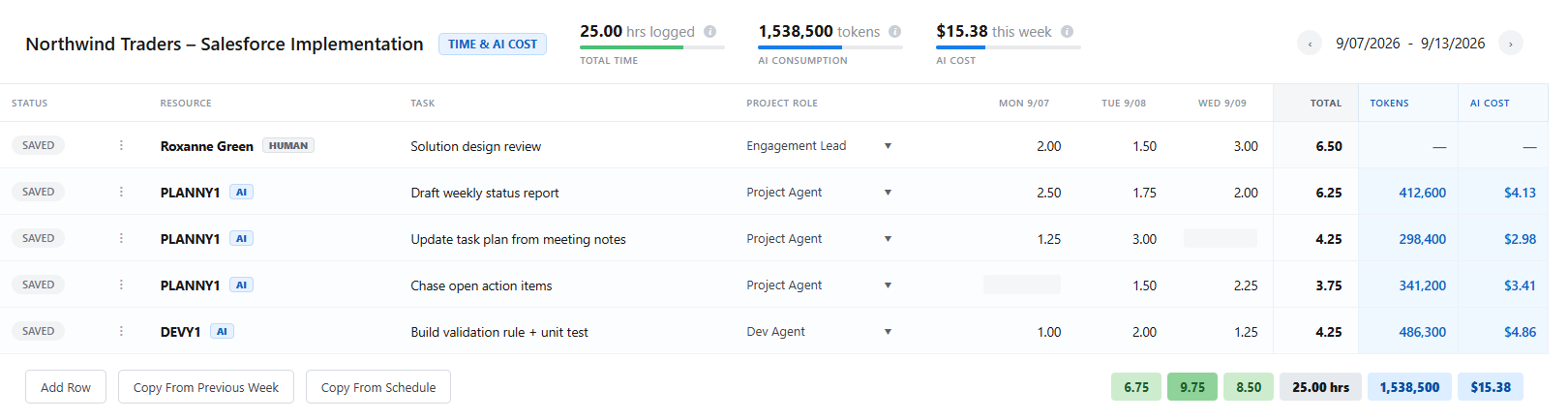
  • Agents log their hours and token cost on the task, next to your people, so the package margin includes the AI cost.
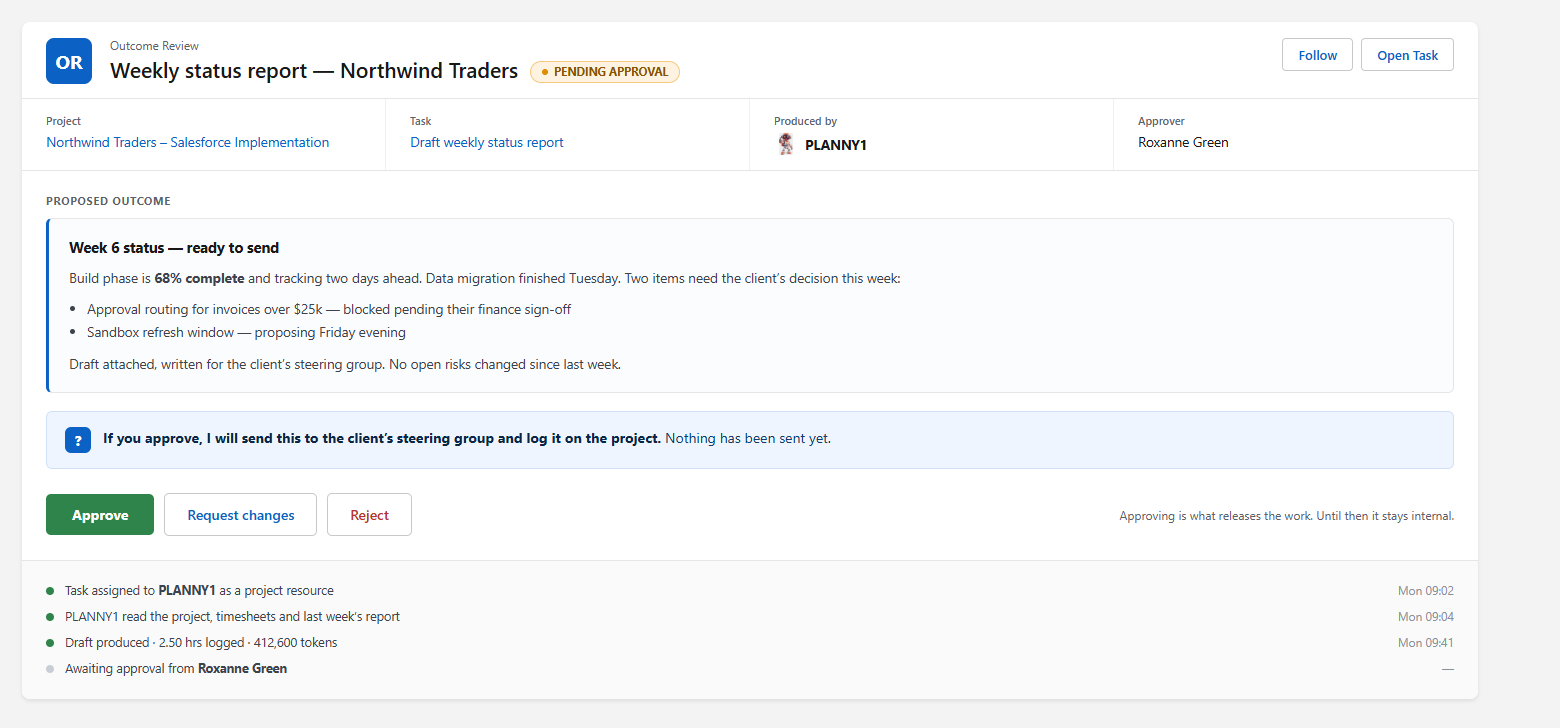
Klient PSA Outcome Review: the PLANNY1 agent produced a draft status report on its assigned task, pending approval with Approve, Request changes and Reject
Outcome Review: the agent’s work waits for a person.
Klient PSA time and cost grid: a person and the PLANNY1 and DEVY1 agents on the same project, each task with hours, tokens and AI cost
Agents and people on one project: hours, tokens and AI cost per task.

Klient Insights: which clients are slipping, and where the margin goes

Klient Insights gives each client a verdict, such as Slipping or At risk, with the reasons behind it: overdue tasks, billable share, unpaid invoices and margin on time logged.

The profitability view compares the value of billable time with the cost of all time logged, month by month, so a fixed-price package that is losing money shows up while you can still fix it.

Klient Insights Account and Project Scorecard: a Slipping or At risk verdict per client with overdue tasks, billable share and margin (demo data)
Account & Project Scorecard: a verdict per client, with the reasons.
Klient Insights Profitability dashboard: value of billable time, cost of all time logged and margin by month (demo data)
Profitability: value of billable time against the cost of all time, by month.

Budget alerts before the overspend

Each campaign has a budget and a daily pace on the client project. Spend is read from Google Ads and Microsoft Ads through the Klient MCP server. When a campaign runs ahead of its pace, an alert goes out with a proposed correction.

The agent proposes. A person approves before any budget moves.

Campaign pacing alertIllustration: spend runs above the planned budget pace; on day 12 an alert proposes lowering the daily cap, pending approval. Google Ads · Spring launch Monthly budget $3,000 · day 12 of 30 $3k$2k$1k$0 Day 11530 Alert: 22% ahead of paceProposed: daily cap $120 → $90Waiting for your approval Planned paceActual spend
Illustration with sample numbers: a campaign running ahead of its budget pace.
Your Team

What happens to my employees?

It is a shift, not a cut. Agents take the production steps: the first draft, the hundredth revision, the weekly report. Every agency still needs people who decide, who create, and who look after clients. You keep your team, and the same team serves more clients.

Producers
Building every page by hand
Set the brand, the templates and the quality bar. Polish what the agent drafts and own what ships.
Decision makers
Chasing status in meetings
Approve the site, the assets, the budget and the launch. The four calls that need a human.
Customer success
Relaying revisions
Own the relationship, the results review and the renewal, across more accounts each.
Support
Making small edits
Handle what needs judgment. Routine change requests are drafted by the agent and checked.
Sales
Waiting on delivery capacity
Sell more packages. Delivery is no longer the bottleneck, so every new client fits.
Same people, more clients, higher margin per package. People are redirected to the work that needs them, and the capacity they free up is new revenue, not a layoff plan.
AI Agents

The agents that run agency delivery

Klient PSA ships with a squad of Salesforce Agentforce agents. For agencies, three carry the delivery load, and every output waits for a person’s approval.

S1

SCOPEY1 · Scoping

Turns the signed brief into a structured scope with deliverables and acceptance criteria, so every package starts with clear boundaries and extra pages are spotted as extras.

P1

PLANNY1 · Project Management

Reads every client project each morning and tells you which sites are on track, which are at risk, and which need a decision from you today.

T1

TOUCHY1 · Client Meetings

Prepares each client meeting, reads the transcript after it, updates the project, and drafts the recap email for your account manager to approve.

Who It’s For

Built for agency leadership

Economic Buyer
Agency Owner / President
Sells packages at a fixed price and finds out at month-end which clients made money. Wants to grow without hiring at the same pace.
“Margin per package, per client, every day. Not at month-end.”
Primary User
Operations Manager / VP Operations
Runs dozens of sites at once across copywriting, design, asset collection and launch. Needs to see what is stuck and who is overloaded without opening ten tools.
“Every site, every step, one screen.”
Champion
Account / Customer Success Manager
Relays client revisions all day instead of growing the account. Wants the client to see progress and give feedback without a meeting.
“My clients comment on the page. I spend my time on the relationship.”
Common Objections

Questions from agency owners

“What is the best software for a marketing agency?”
Klient PSA is marketing agency software built 100% natively on Salesforce. It runs every client website, campaign asset and campaign budget as a project: AI agents produce the first drafts, your team approves them, and every hour and dollar is tracked against the client budget. Plans start at $39/user/month and most agencies go live in about three weeks.
“What happens to my team when agents produce the work?”
The work shifts; the team stays. Producers move from building every page to setting the brand and owning final quality. Account and customer-success managers handle more clients each. Leaders spend their time on the decisions that need a human: what to approve, what to launch, what to spend. Most agencies use the freed capacity to take on more clients with the same people, which is where the margin comes from.
“Will AI-built websites look generic?”
Only if you let them. The agent works from your brief format, your templates and your brand rules, and every version goes to your producers and your client before anything goes live. The agent writes version one in minutes; your designers decide what ships.
“How are ad budgets controlled?”
Each campaign budget lives on the client project in Klient PSA. Spend is read from Google Ads and Microsoft Ads through the Klient MCP server, Klient Insights shows pacing against budget, and an alert goes out when a campaign drifts. The agent can propose a change; a person approves it before any budget moves.
“We don’t use Salesforce. Do we need it?”
No. Every Klient PSA tier includes the Salesforce Platform license it runs on, covering Klient PSA plus Salesforce Accounts and Contacts, so there is nothing else to buy to run your delivery. Opportunities and Cases are not included: if you later want Salesforce for your sales pipeline or support desk, those users need their own Salesforce license.
“Does it work with Duda, WordPress or our own site builder?”
Yes, through the builder’s API or MCP server. The agent produces the pages and assets; publishing goes through whatever your platform exposes, once a person has approved the version. Where the platform has no API, your team publishes the approved version by hand.

Keep your team.
Grow your margin.

See one of your own briefs go from signed to launched: the website, the campaign assets and the budget, with your people making the calls.

Book a Demo →